Remote Data Pull
One-line summary
This deployment is the "downstream". It pulls system-built-in (PUBLIC) resources from an "upstream" ThinkLink deployment.
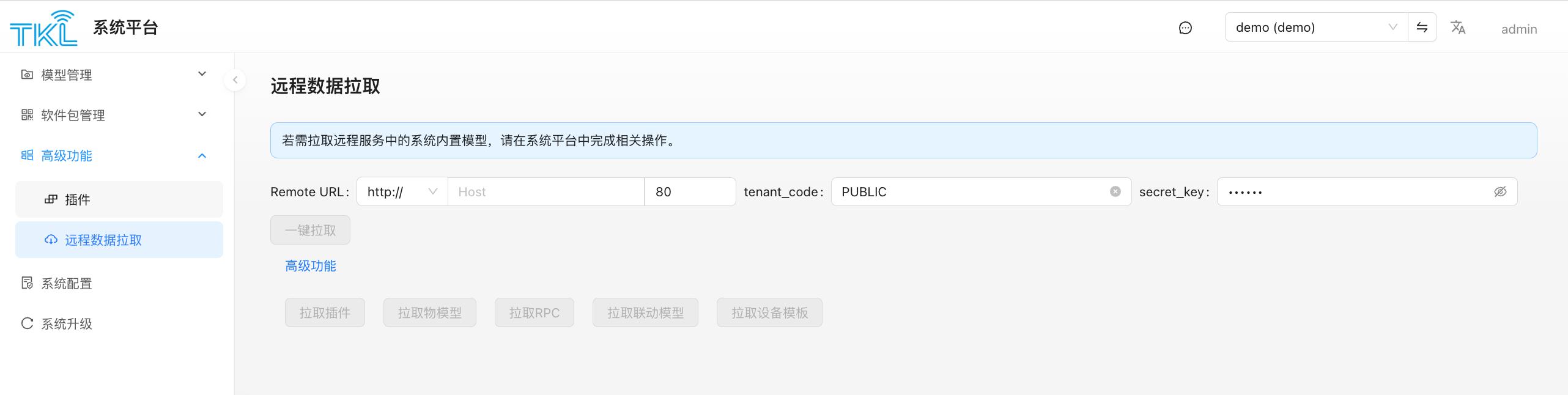
System Platform → Advanced → Remote Data Pull lets a TKG gateway / TKE / Docker standalone ThinkLink instance sync built-in thing models, RPC models, trigger models, device templates, and plugins from a central (upstream) ThinkLink deployment. In a distributed-deployment scenario this is the main channel for keeping each node's "built-in model library" consistent.
When to Use
- A field-installed TKG gateway needs an updated local set of thing models / plugins but nobody is going to maintain them by hand → configure the upstream and pull on demand.
- A customer's privately-deployed TKE wants to reuse the official models and device templates curated on the vendor's central server.
- Multiple branch deployments unify on resources curated by a single master site.
Prerequisite: Enable Pull on the Upstream
On the upstream ThinkLink you intend to pull from:
- Log in as admin → System Platform → System Config → Network Service Config.
- Turn on the
Allow Data Pullswitch. - Click the button next to
Secret Keyto generate / refreshsecret_key, and copy it.
Note the upstream host, port (default 80), and that secret_key — you will need them in the next step.
Configure and Pull from This (Downstream) Side
Back on the "Remote Data Pull" page on this deployment:
| Field | How to fill |
|---|---|
| Remote URL | Protocol (http:// / https://) + Host + Port; defaults to 80 |
| tenant_code | Defaults to PUBLIC; normally don't change (pulling upstream PUBLIC-scope resources) |
| secret_key | Paste the secret you generated on the upstream |
Then:
- Click
One-Click Pull— sync plugins, thing models, RPC, trigger models, and device templates in one shot. - Or expand
Advanced Featuresto pull only one category at a time:Pull PluginsPull Thing ModelsPull RPCPull Trigger ModelsPull Device TemplatesPull Device ConfigsPull Devices via Local Device TemplatePull LoRaWAN Profiles
Incremental top-up
The per-category buttons under "Advanced" are useful when the upstream has added one new category and you only want to top up that one, without re-pulling the entire set.
Pull Behavior
- Pulled resources are written into the local PUBLIC scope and show up in the corresponding "Model Management / Plugin" lists.
- Same-ID resources are upserted: any local PUBLIC record with the same ID is overwritten by the upstream version.
- Only the upstream's PUBLIC scope is pulled; other tenants' private models on the upstream are not exposed.
Troubleshooting
| Symptom | Likely cause |
|---|---|
| Connection failed / timeout | Wrong URL/port, upstream port not open, network/firewall blocked |
| 401 / 403 | Upstream Allow Data Pull is off, or the secret_key doesn't match |
| Pull succeeds but nothing new appears | Upstream PUBLIC scope had no such resources to begin with |
| Some plugins fail | Plugin's dependent resource (e.g. a related thing model) was not pulled together; prefer "One-Click Pull" to avoid dependency gaps |
Related Pages
- Where to open the secret on the upstream → System Config — Network Service Config
- Where pulled resources land → Model Management, Plugin