KS52 Temperature and Humidity SensorV1.0
1. Product Introduction
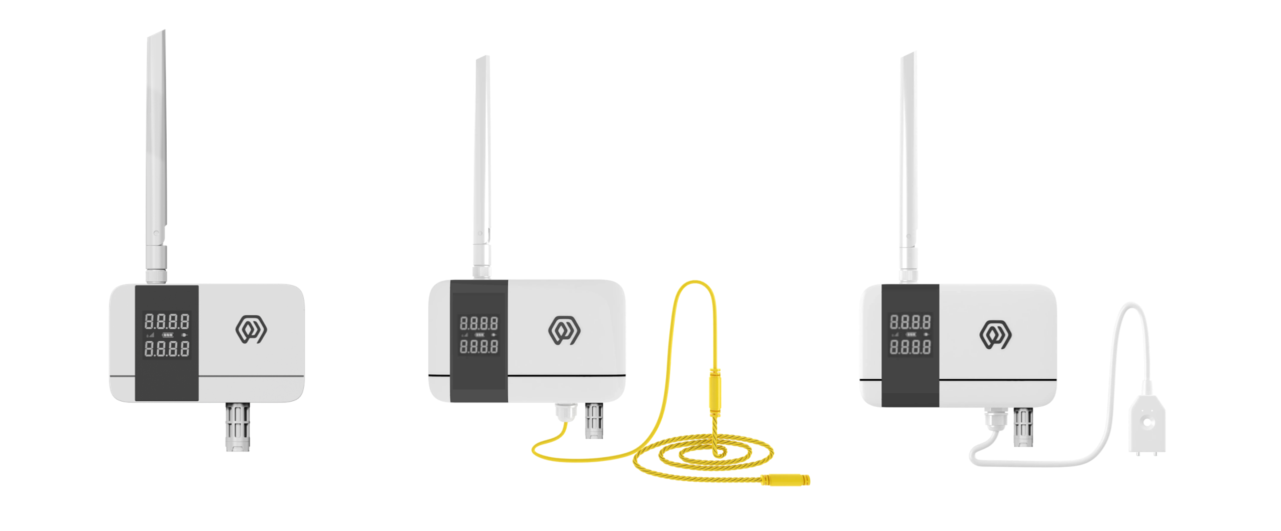
2. Product Introduction
KS52 is a LoRa-based ® The digital temperature and humidity sensor of wireless technology uses high-precision sensing elements to collect environmental temperature and humidity data in real time, and through LoRaWAN ® The protocol periodically reports measurements to the application platform.
The KS52's optional water leakage detection function enables real-time monitoring of water leakage incidents and triggers alarms to immediately notify management personnel, allowing prompt on-site response. This feature helps protect warehouses, storage facilities, factories, and similar environments, preventing loss or damage to goods and equipment caused by water intrusion.
Users can flexibly configure the sampling and reporting period through the management platform, and the default setting is to upload data every 15 minutes.
The product has 4 built-in 2700mAh high-capacity lithium sub-batteries. With low-power design, the battery life can reach more than 6 years in typical application scenarios.
Relying on LoRaWAN ® Standard protocol, KS52 has the advantages of long-distance transmission and low-power operation, and supports access to ManThink Technology and third-party LoRaWAN. ® The gateway is compatible with IoT platforms such as ThinkLink, ChirpStack, and The Things Network(TTN) to realize remote monitoring and intelligent management of environmental parameters.
KS52 with IP65 level of advanced protection, resistant to complex outdoor environment, widely applicable to intelligent industry, intelligent buildings, warehousing and logistics, agricultural monitoring and other scenarios, to meet the application requirements of all-weather environmental monitoring.
3. Features
- IP65
- Battery powered, 10800mA high performance lithium battery, battery life can reach more than 6 years
- COV
- Low power LCD display
- Temperature accuracy: ± 0.3 ℃
- Humidity accuracy: ± 3% RH
- Support ThinkLink/ChirpStack/TTN platform docking
- Support US902,AU915,AS923,EU868,EU433,CN470 LoRaWAN standards
4. Parameters
| Parameter | Specification |
|---|---|
| Temperature/humidity sensor | IP65 waterproof sensor (SHT41 package) |
| Water-leak sensor | Point/rope type |
| Wire count | 0 |
| Display | Low-power segment LCD |
| Acquisition interval | 5 seconds |
| Temperature accuracy | ±0.3 ℃ |
| Humidity accuracy | ±3%RH |
| Item | Value |
|---|---|
| § Wireless Parameters | |
| Protocol | standard LoRaWAN ® Agreement |
| Regional Standards | CN470/EU433/EU868/AS923/AU915/Us902 |
| Transmit power | maximum Support 22dBm ( can be changed) |
| Receiving sensitivity | -142dBm(SF=12,BW=125kHz) |
| Working mode | OTAA/ABP Class A |
| § Configuration | |
| Test /Trigger mode | the magnet 2 seconds trigger heartbeat data > 6 seconds trigger joining |
| Parameter Configuration | by NS issue instruction |
| § Physical Characteristics | |
| Power supply mode | 4*2700 mAh ER14505 lithium battery |
| Sleep current | <5uA (25 ℃ at room temperature) |
| Emission current | <110mA (22dBm transmit power) |
| Battery life | 6 years (15-minute reporting cycle, 25 ℃ at room temperature) |
| Working Temperature | -40°C ~85°C |
| Relative humidity | ≤ 95% (no condensation) |
| Protection level | IP65 |
| Material & Color | ABS + PC, White |
| Dimensions | 120mm * 72mm * 28mm |
| Installation method | Wall Hanging |
5. Dimensions and Interfaces
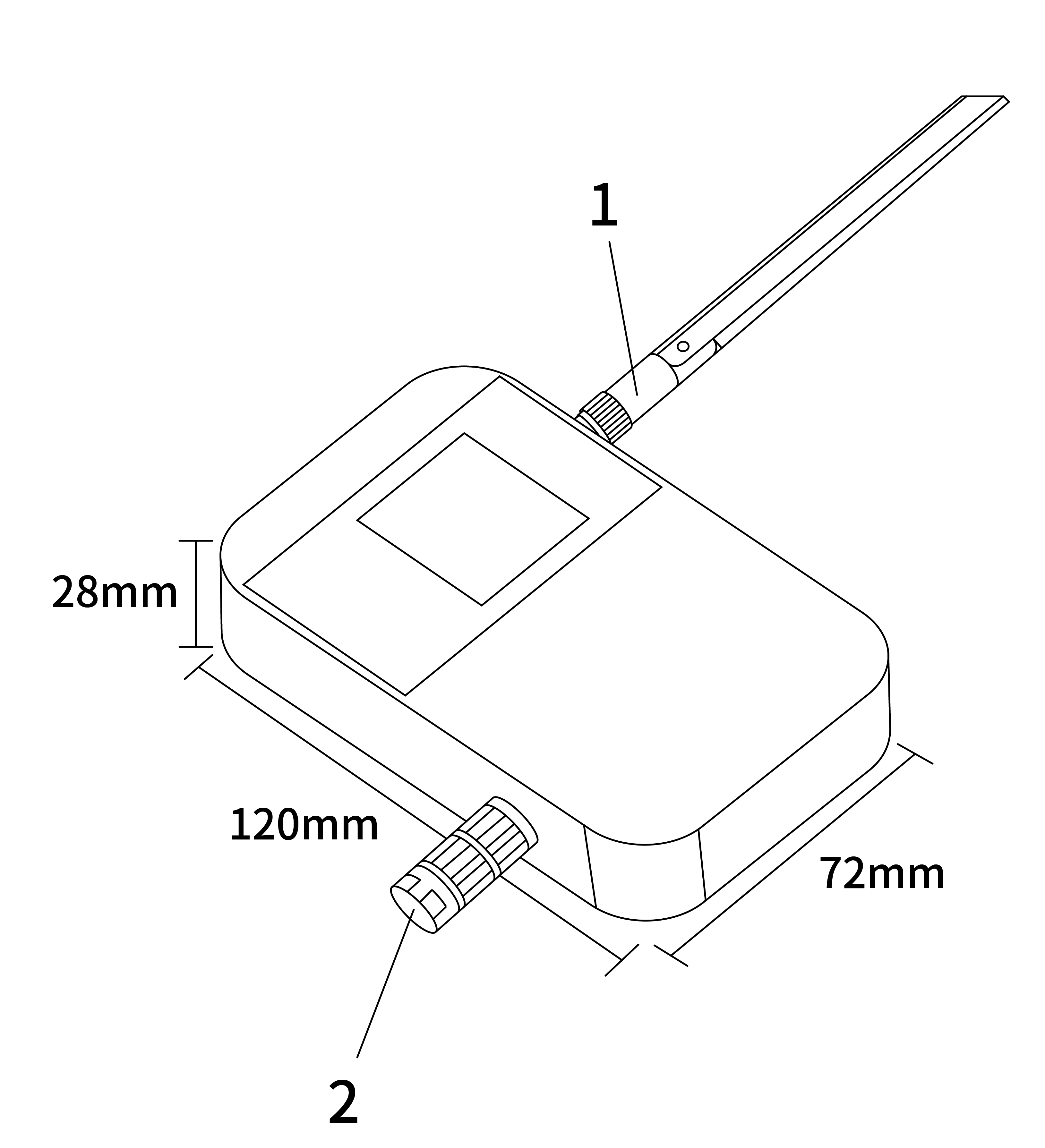
| No. | Interface |
|---|---|
| 1 | LoRa antenna interface |
| 2 | Sensor interface |
6. Product Model
6.1 Model example
KS528-A1-AS923-N
6.2 Model component breakdown
KS528: product series and RF band.KS52identifies a second-generation IP65 temperature and humidity sensor.8identifies the 800 MHz-and-above RF version for EU868, AS923, AU915 and US902.- Other band option:
4identifies the 400 MHz RF version for EU433 and CN470.
-A1: sensor combination and power configuration.Aidentifies a temperature-and-humidity-only configuration.- Other sensor options:
Badds point water-leak detection, whileCadds rope water-leak detection. 1identifies a built-in 10800 mAh battery.- Other power options:
2identifies external DC 5–24 V input, while3identifies an external 2.2–3.6 V battery.
-AS923: LoRaWAN regional standard.AS923means that the device supports the LoRaWAN AS923 regional parameters.- Other regional codes are
CN470,EU433,EU868,AU915andUS902;US902denotes the LoRaWAN US915 (902–928 MHz) regional parameters.
-N: default version.Nidentifies the default version.- Other values are reserved for customized or special versions.
6.3 Complete model meaning
The complete meaning of KS528-A1-AS923-N is:
This is a second-generation IP65 temperature and humidity sensor in the 800 MHz-and-above RF class. It uses the temperature-and-humidity-only sensor configuration, includes a 10800 mAh battery, supports the LoRaWAN AS923 regional standard, and uses the default final version code N.
7. Network topology
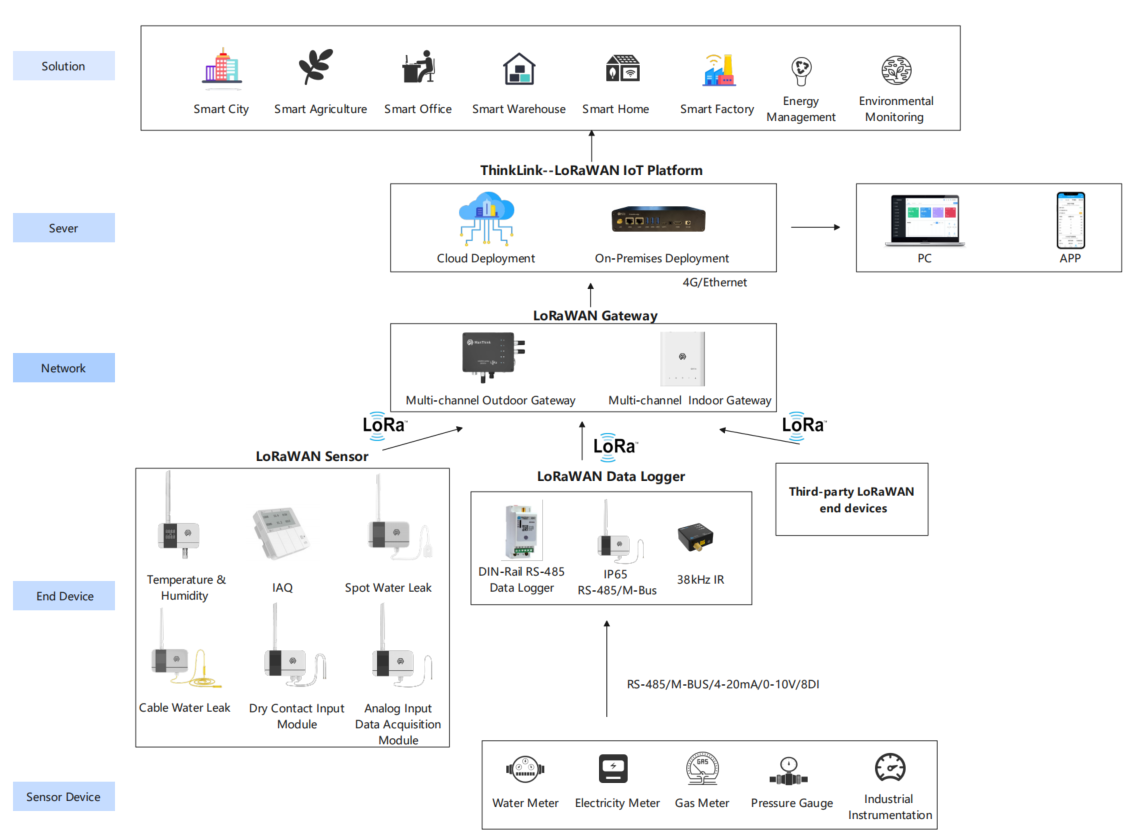
KS52 is a terminal device that conforms to the standard LoRaWAN protocol, and its normal operation depends on the complete LoRaWAN network support. The network needs to include LoRaWAN gateway and network server (NS), wherein the Gateway can choose the self-developed products of ManThink or the third-party compatible equipment, and NS must have the capability of protocol resolution and equipment management.
KS52 supports access to LoRaWAN Network platforms, including ThinkLink, ChirpStack, and The Things Network (TTN), to ensure flexible deployment and system integration. Users can use ThinkLink IoT platform to configure the object model, implement rich functions such as data parsing, business logic processing, and card view display, and quickly build application systems for actual scenarios.
A typical LoRaWAN network topology is as follows:
8. Working mode
8.1 Periodic collection and Upload
- KS52 collects temperature and humidity values every 5 seconds, and uploads the temperature and humidity values according to the set period. The Upload period can be set by NS delivery.
- KS52 continuously monitors the water leakage status,
- Upload alarm information after leakage event.
- After transmit the alarm information, enter the protection mechanism and no alarm will be given within 1 minute.
- 1 minute after the alarm, the detection probe level status will upload information again if there is no water leakage
_Note: It is impossible to detect the leakage state of non-conductive liquids, such as organic solvents, purified water, etc. _
8.2 COV Upload
KS52 supports COV mode, when the temperature or humidity changes exceed the threshold, you can trigger a packet of data upload. The Upload protocol format is the same as the periodic Upload format.
KS52 default COV temperature threshold is 1 ℃, and default COV humidity threshold is 5% RH.
8.3 Communication Test
Use a magnet to stick the location of QR code on KS52 to trigger 2s-4S, which can trigger a packet of measurement data.
8.4 Network access
Use a magnet to stick the location of QR code on KS52 to trigger 6s-8s, which can trigger a packet of LoRaWAN join.
9. Installation
9.1 Wall Mount
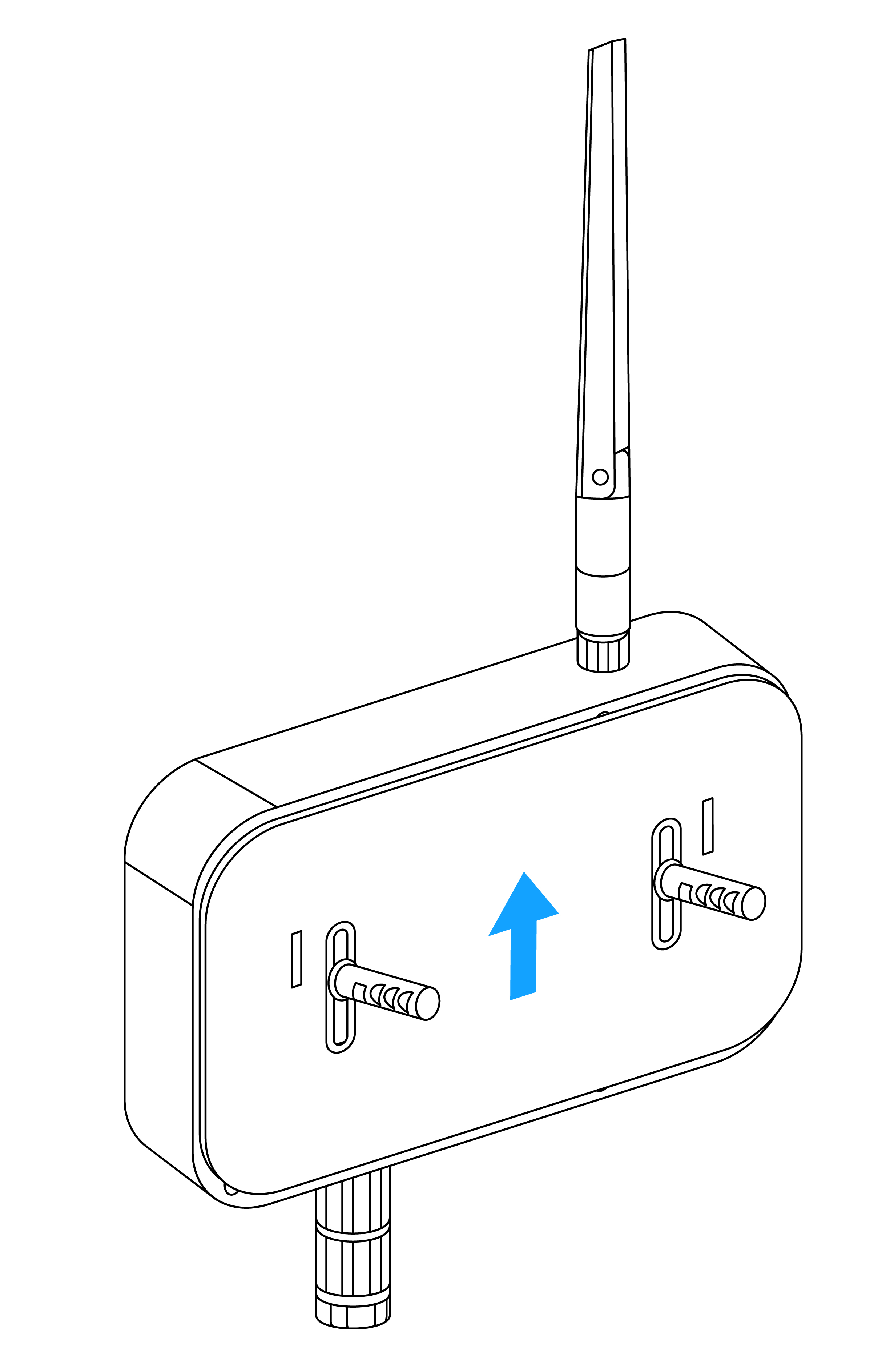
- Fix back panel to wall (keep back panel Arrow Up)
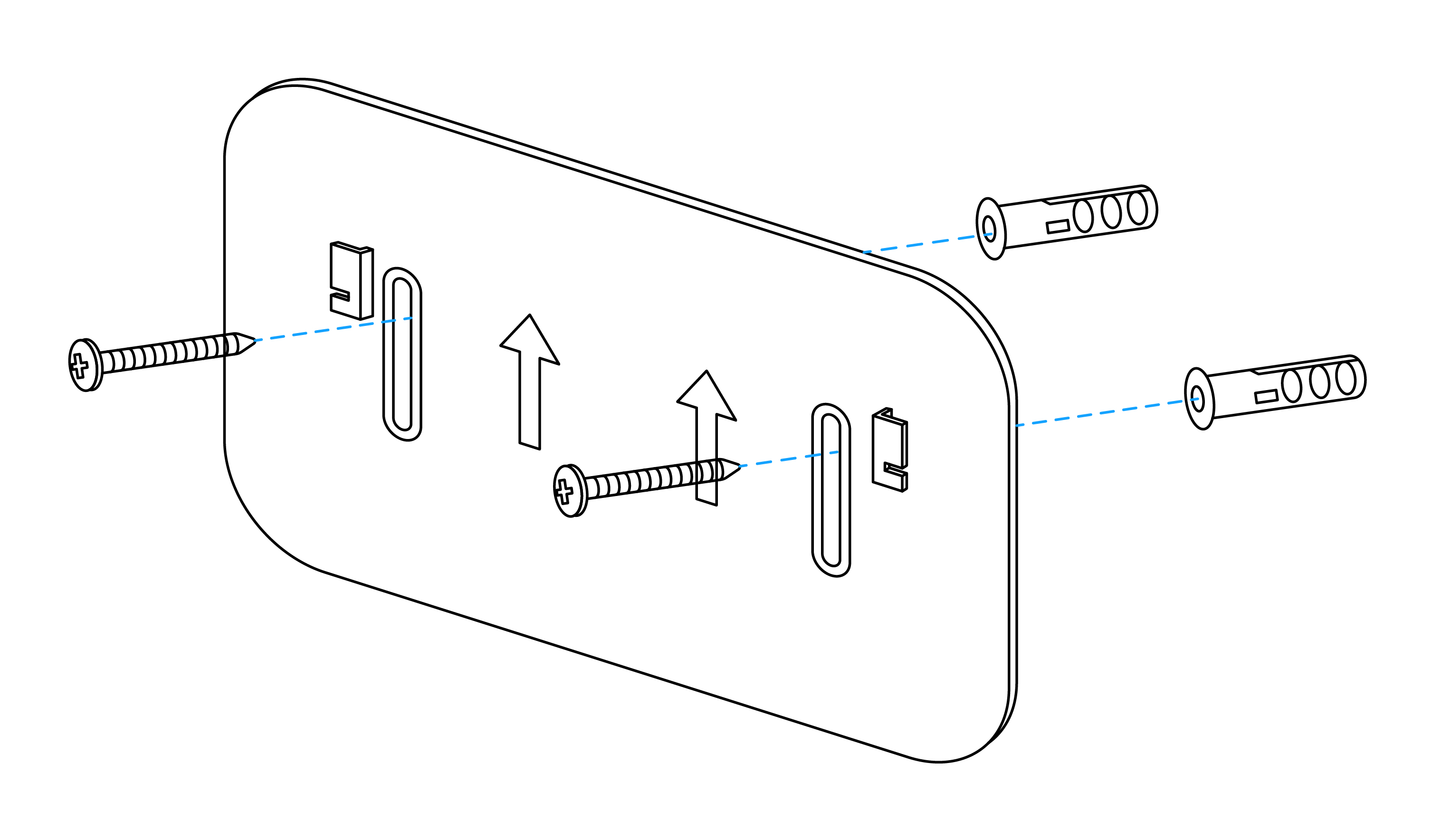
- Tighten the LoRa antenna to the antenna interface
- Hitch the temperature and humidity sensor on the back plate (after aligning the back groove of the sensor with the convex part of the back plate, slide it down)
9.2 Single point type water immersion installation diagram:
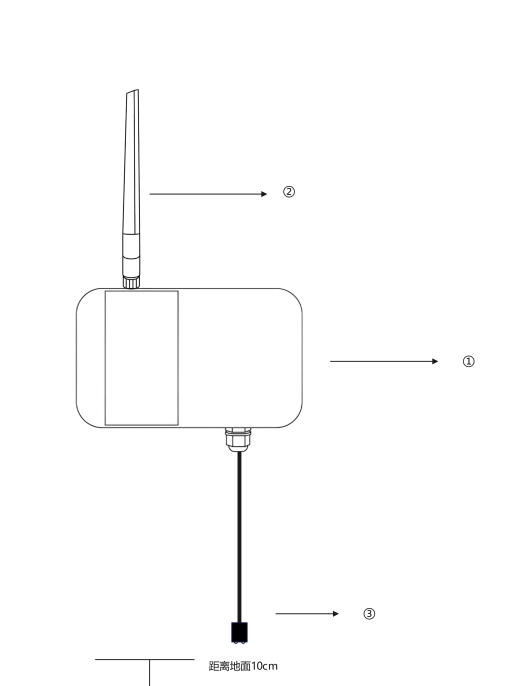
① Hang the water detector sensor vertical wall on the wall, and the back of the water leakage sensor is installed with a back plate for fixing.
② Tighten the LoRa antenna
③ The root of the water immersion probe shall be closely attached to the wall surface with double-sided adhesive, and the height from the ground shall be 10cm.
_Note: Please ensure that the installation is covered by the Gateway when leakage _
9.3 Rope type water immersion installation diagram:
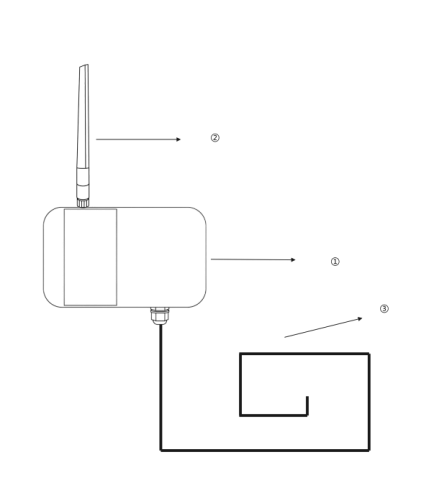
① Hang the water leakage vertical wall on the wall, and the back of the water leakage sensor is equipped with a back plate for fixing.
② Tighten the LoRa antenna
③ Water leakage detection extension rope
preparation tools: Impact drill, drill bit, Phillips screwdriver, Buckle
use an electric drill to drill holes in the installation position in advance. The left and right sides of the water leakage detector will be equipped with installation holes, which will be fixed by screws. Then connect the extension cord, and use the buckle to fix the extension cord at the position where the water leakage needs to be monitored.
10. Data Items and Identifiers
- [x] LoRaWAN port number = 11
KS52 supports only one data format and sends data periodically according to the set period. When a COV event occurs, it triggers one frame of uplink data.
Example (hex):21 07 03 0C 6E A005 00 F604 8C03 DB 00 00
| Number | Data Item | Example | Start Address | Length | Description |
|---|---|---|---|---|---|
| 1 | Version number | 0x21 | 0 | 1 byte | Fixed at 0x21 |
| 2 | Control word | 0x07 | 1 | 1 byte | Fixed at 0x07 |
| 3 | Identifier | 0x03 | 2 | 1 byte | Fixed at 0x03 |
| 4 | Hardware version | 0x0C | 3 | 1 byte | Decimal 10 represents V1.0, and so on |
| 5 | Software version | 0x6E | 4 | 1 byte | Decimal 100 represents V1.00, and so on |
| 6 | Reserved bytes | A0 05 | 5 | 2 bytes | Reserved; do not use for application parsing |
| 7 | Device status | 0x00 | 7 | 1 byte | See the bit0, bit1, bit2, and bit4 definitions below |
| 8 | Temperature | 0x04F6 | 8 | 2 bytes | Unsigned 16-bit little-endian integer; actual temperature = (raw value - 1000) / 10 ℃ |
| 9 | Humidity | 0x038C | 10 | 2 bytes | Unsigned 16-bit little-endian integer; actual humidity = raw value × 0.1 %RH |
| 10 | Battery voltage | 0xDB | 12 | 1 byte | Actual value = sample × 1.6 / 254 + 2 V |
| 11 | RSSI | 0x00 | 13 | 1 byte | Actual value = reported value - 160 dBm |
| 12 | SNR | 0x00 | 14 | 1 byte | Actual value, unit: dB |
10.1 Device status bit mapping
| Bit | Status item | 0 | 1 |
|---|---|---|---|
| bit0 | Sensor status | Normal | Fault |
| bit1 | LoRaWAN mode | Class A | Class C |
| bit2 | Display status | Normal | Fault |
| bit4 | Water-leak status | Dry | Water detected |
11. ThinkLink reference model
Sign in to ThinkLink, search for KS52 in the model menu, and add the device with the MT-KS52 template.
12. Parameter modification
KS52 supports remote parameter configuration by sending downlink commands through a LoRaWAN Network Server (NS).
Parameter modification uses the ManThink Technology application-layer general protocol. All parameter configuration commands are transmitted via LoRaWAN port 214.
- Communication port: 214
- Function code: 0xCF (Modify service parameters)
- Multi-byte parameters: Little-endian format
- Successful parameter configuration response:
6F 01 0012.1 Parameter Configuration Address Table
| Index | data Item | default Value | start Address | length | description |
|---|---|---|---|---|---|
| 1 | data period | 900 | 40 | 4 bytes | upload cycle, in seconds |
| 2 | measure period | 5 | 142 | 2 bytes | little Endian mode, in seconds |
| 3 | temperature COV | 10 | 144 | 1 byte | magnification 0.1, unit ℃ |
| 4 | humidity COV | 20 | 145 | 1 byte | magnification 0.1, unit: RH% |
| 5 | Temperature offset | 0 | 146 | 1 byte | Signed, 0.1 °C per count |
| 6 | Humidity offset | 0 | 147 | 1 byte | Signed, 0.1 %RH per count |
12.2 Parameter Modification Examples
12.2.1 Modify Upload Interval (Single Command)
Example: Set the upload interval to 900 seconds
- Hex representation:
0x00000384 - Little-endian format:
84 03 00 00
Command:
CF 06 28 04 84 03 00 0012.2.2 Modify Collection Interval and COV Parameters (Continuous Addresses, Single Command)
Example parameter settings:
| Parameter | Target Value | Written Value |
|---|---|---|
| Collection interval | 5 seconds | 05 00 |
| Temperature COV | 1.0 °C | 0A |
| Humidity COV | 2.0 %RH | 14 |
- Start address: 142 (0x8E)
- Continuous length: 4 bytes (142–145)
Command:
CF 06 8E 04 05 00 0A 1412.2.3 Example of Concatenated Downlink Commands
On the NS platform, multiple parameter modification commands can be concatenated into a single downlink payload. The device will parse and execute them sequentially.
CF 06 28 04 84 03 00 00 CF 06 8E 04 05 00 0A 1412.2.4 Notes
- All parameter configurations must use LoRaWAN port 214
- KS52 is a Class A device and can only receive downlink parameter configurations after an uplink transmission
- If no response is received after parameter configuration, please check the device online status and gateway coverage
12.3 Temperature calibration
KS52 and KS53 use the same temperature offset parameter: address 146 (0x92), 1 byte, signed integer, 0.1 °C per count, default 0. The commands below are derived from the parameter table and PTL-D01 V1.5.
12.3.1 Offset encoding
Written integer = target temperature offset / 0.1 °C. For example, +1.0 °C is integer 10, encoded as 0A; -1.0 °C is integer -10, encoded as F6 in 8-bit two's complement. Do not encode a negative offset as its positive magnitude.
The field represents -12.8 to +12.7 °C in 0.1 °C steps. This is the encoding range, not the sensor accuracy or a guaranteed correction range. Reject values outside this range instead of truncating or wrapping them.
| Target temperature offset | Signed integer | Value byte | Downlink payload (HEX) |
|---|---|---|---|
| +1.0 °C | 10 | 0A | CF 03 92 01 0A |
| -1.0 °C | -10 | F6 | CF 03 92 01 F6 |
| 0 °C (clear temperature offset) | 0 | 00 | CF 03 92 01 00 |
CF is the write function, 03 counts the following three bytes, 92 is the parameter address, 01 is the value length, and the last byte is the target offset. Each write sets the parameter to the supplied value. Clearing the temperature offset does not reset other device parameters.
12.3.2 Calibration procedure
- Confirm that the device is online, the model is correct, and its firmware supports the temperature offset parameter. Place the probe and reference thermometer in the same stable environment. Wait for stable readings and record the reference reading, device reading, and existing offset.
- Read the current offset as described under Readback and reset. To calibrate from zero, record the original value, clear the offset, verify it by reading it back, and take new measurements. Do not treat a measurement difference obtained with an existing offset as a new absolute offset.
- Select the target offset and encode it in 0.1 °C units. In the NS device downlink interface, select HEX, set FPort = 214, and enter the corresponding payload.
- Wait for an uplink so the device can receive the downlink. A Class A device receives commands in the receive windows following an uplink. For a manual uplink, use the model-specific magnet duration under Communication Test.
- Check the response.
6F 01 00means the parameter write succeeded.4F 01 xxmeans it failed, withxxindicating the error code. An NS status of queued or sent does not establish that the device accepted the parameter. - Send a separate read request to verify the saved value. Wait for new measurements and compare them with the reference. Check both the display and reported readings, and any platform-side compensation, to avoid applying the correction twice.
The current documentation does not specify the minimum supported firmware version, how the offset affects the display and reported values, or whether it survives power loss. Verify these behaviors on the target device before operational use. A successful parameter write does not prove the measurement correction is effective.
12.3.3 Readback and reset
Read the temperature offset through port 214:
8F 02 92 01For example, the protocol response for an offset of -1.0 °C is:
2F 03 92 01 F6Interpret the last byte as unsigned b: the signed value is b when b < 128, or b - 256 otherwise. Temperature offset = signed value × 0.1 °C.
To restore zero offset, send CF 03 92 01 00, check the successful write response, and read back 2F 03 92 01 00. Record the date, device identifier, reference instrument, readings before and after calibration, and final offset.
12.4 Humidity calibration (KS52 only)
The KS52 humidity offset is at address 147 (0x93): 1 signed byte, 0.1 %RH per count, default 0. Follow the temperature-offset procedure using a reference hygrometer. The KS53 temperature sensor parameter table has no humidity offset; do not apply these commands to KS53.
| Operation | Downlink payload (HEX, port 214) |
|---|---|
| Set humidity offset to +1.0 %RH | CF 03 93 01 0A |
| Set humidity offset to -1.0 %RH | CF 03 93 01 F6 |
| Clear humidity offset | CF 03 93 01 00 |
| Read humidity offset | 8F 02 93 01 |
The encoding range is -12.8 to +12.7 %RH in 0.1 %RH steps. It is an offset in %RH, not a relative percentage multiplier. The successful write response is also 6F 01 00. For example, reading -1.0 %RH should return 2F 03 93 01 F6.
To set a temperature offset of +1.0 °C and a humidity offset of -1.0 %RH together, write two consecutive bytes starting at address 146:
CF 04 92 02 0A F6This combined command applies only to KS52. To change temperature alone while preserving the humidity offset, use the single-byte command under Temperature calibration.
13. Contact Us
Website: www.manthink.cn
Email: info@manthink.cn
Tel: +86 15810684257
14. Manual Downloads
PUBLIC integration models
Select MT-KS52 and check the models and RPCs below. Confirm parameter changes from fresh device feedback; Class A operations wait for receive windows. Template defaults do not establish the current configuration of existing devices.
Model catalog
| Model type | Name | id_name | Platform model ID |
|---|---|---|---|
| Template | MT-KS52 | 4 | |
| Thing Model | [MT KS52 PARA] | mt_ks52_para | 93429673559592965 |
| Thing Model | MT-KS52 | mt_ks52 | 22321109718274053 |
| RPC | [MT KS52/KS53] 偏移校准 | mt_ks52_ks53_calibrate | 153106306377347072 |
| RPC | [KS52 SET] 分时段告警阈值配置 | mt_ks52_set_alarm | 108591944933732352 |
| RPC | [KS52 ACT] 消除告警 | mt_ks52_clear_alarm | 108591944933732353 |
| RPC | [MT KS52 GET] | mt_ks52_get | 64745507724988421 |
| RPC | [MT KS52 SET] | mt_ks52_set | 64744037067788293 |
| Trigger | mt_ks52_trigger | 108613983216340997 |