System Config
System Platform → System Config centrally maintains the basic infrastructure of the whole deployment: email outbound, third-party login, brand identity, and the cross-deployment data-sync secret. For a standalone deployment (TKG/TKE/Docker), this is the first page you should configure.
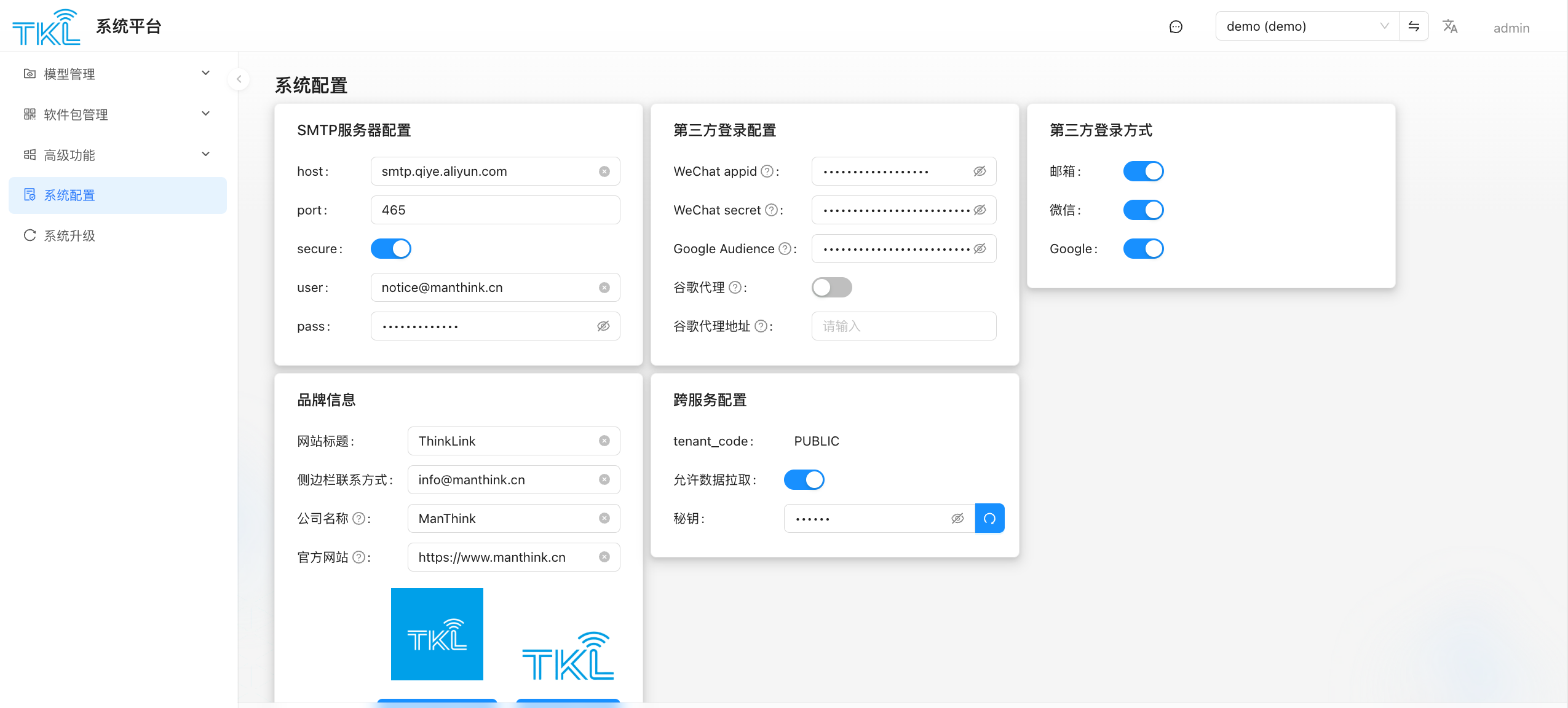
The page is split into five sections, covered below.
SMTP Server Config
The outbound mail server for the entire deployment (registration verification, forgotten passwords, alarm notifications all flow through here).
| Field | Meaning |
|---|---|
| host | SMTP server address, e.g. smtp.qiye.aliyun.com |
| port | Port, commonly 465 (SSL) / 587 (STARTTLS) / 25 |
| secure | Whether to use SSL/TLS. Usually on for 465, situational for 587 |
| user | Login username (sender email) |
| pass | Login password or authorization code |
Submit at the bottom to save. To verify, have a test account trigger a "registration verification email".
Third-Party Login Config
Holds the credentials issued by third-party platforms. This section is only the credentials — whether users can actually log in this way is controlled by the "Third-Party Login Methods" switches on the right.
| Field | Meaning |
|---|---|
| WeChat appid | AppID issued by WeChat Open Platform |
| WeChat secret | Corresponding AppSecret on WeChat Open Platform |
| Google Audience | Audience (client_id) of the Google OAuth client |
| Directory Proxy | Whether to route traffic through a proxy for external services (e.g. Google OAuth) |
| Directory Proxy Address | Proxy server address |
Third-Party Login Methods
Three switches that decide which login entries the login page exposes:
| Switch | Meaning |
|---|---|
| Email + password (most common) | |
| WeChat QR-code login (depends on the WeChat appid/secret above) | |
| Google account login (depends on Google Audience) |
Turning off a switch immediately removes the corresponding entry from the login page.
Brand Info (Crucial for White-Label Standalone Deployments)
When delivering a white-labeled deployment to a customer, edit this section to rebrand the entire platform:
| Field | Meaning |
|---|---|
| Site Title | Browser tab, page header, login page main title. Default ThinkLink |
| WeChat Contact | Contact WeChat shown in the page footer |
| Company Name | Company entity shown in the footer |
| Official Website | Footer company link |
| Logo Images (two) | Login-page main logo + top sidebar logo. Click to upload |
TIP
After saving, currently-open pages need to be refreshed to see the new logo and title.
Network Service Config
Open this if you want others to pull from you
This section provides server-side admission for Remote Data Pull. If this deployment will not be pulled by any downstream node, you can leave it off.
| Field | Meaning |
|---|---|
| tenant_code | The exposed tenant scope identifier, defaults to PUBLIC. Downstream pullers must use the same value |
| Allow Data Pull | Master switch. When off, all external pull requests are rejected |
| Secret Key | The secret a downstream must present to pull. Click the button on the right to regenerate |
For the matching usage, see Remote Data Pull.
If the secret leaks
If you suspect the secret_key has leaked, click "Regenerate" immediately to rotate it, then notify every legitimate downstream to update their pull config.