1. Organization
1.0. Why You Need an Organization
All ThinkLink features — device profiles, thing models, triggers, data forwarding — operate within an organization context. You must create or join an organization before you can use the platform.
Naming Your Organization Account
If you are using ThinkLink built into a gateway (TKG) or a self-hosted ThinkLink instance (TKE), it is strongly recommended to use the same organization account name as your official cloud platform organization.
This provides two benefits:
- Seamless gateway switching: The
tenantfield in gateway subscriptions stays the same, so you can switch between the cloud platform, TKG, and TKE without changing any configuration. - Easier profile and model sync: When migrating device profiles and thing models between platforms, a consistent organization account eliminates the need for manual remapping.
Recommended Workflow — Best Practice for TKG / TKE
- Create your organization on the official cloud platform first, then set up devices, configure thing models, and debug your business logic there.
- Once everything is verified, sync the profiles and models to your TKG or TKE (private deployment).
- Use the same organization account name on the private instance to ensure a smooth transition.
Developing directly on a private instance increases debugging difficulty and lacks the convenient visualization tools available on the cloud platform. We recommend using the cloud platform as your primary development environment.
1.1. Organization Permission
- each user account can only manage one organization as an administrator.
- But can be as a member join other organizations, and participate in collaboration within the scope of authority.
1.2. New Organization
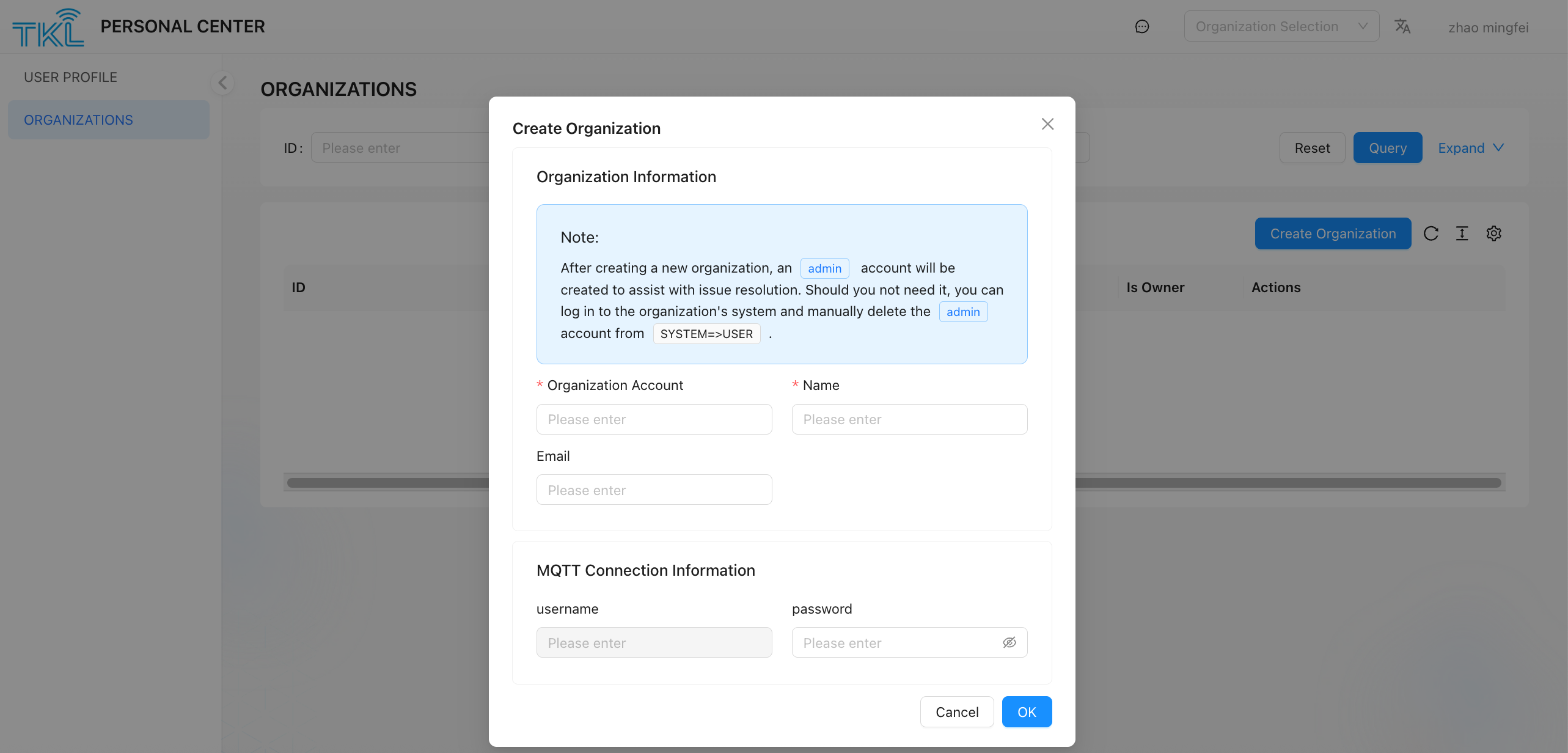
it is applicable to users who want to create a new organization and serve as its administrator. Note that after the user adds a new organization, the admin account will be automatically added to assist the user in handling problems. If the admin account is not required, please log on to the system page of the organization and clickSystem ->User delete admin manually.
- Enter
ORGNIZATIONSpage, click Creat Organization button. - Fill in the following required information (all fields need to be unique within the system):
| field Name | description |
|---|---|
| Organization Account | the unique code used to identify the organization. It consists of lowercase letters, numbers, and underscores (_). This account will be used to generate the user code and be used as tenant field. |
| Name | the display name of the organization, which can be used for external display. |
| MQTT password | used for identity authentication when a third-party platform subscribes to ThinkLink data through the MQTT protocol. Please keep this password safely. |
- After confirming that the information is correct, click Submit, and the system will create a new organization, and the current user will automatically become the administrator of the organization.