EB Compiler SDK User Guide
1. Overview
1.1 Core Concepts
The EB Compiler SDK is an event-driven framework for IoT data collection and transmission. Three principles underpin it:
- Event-driven architecture: all operations are triggered by events.
- Periodic execution: both query events and uplink events run on configurable cycles.
- Data stream processing: sub-device data is acquired through query events, optionally processed, and transmitted to the cloud via uplink events.
1.2 Event Types
| Event | Description |
|---|---|
QueryEvent | Periodically sends a command to a sub-device via UART/RS-485 and waits for a response. |
UpAfterQueryEvent | Like QueryEvent, but uploads the raw response directly — no copy/convert rules needed. |
LoraUpEvent | Periodically transmits the assembled txBuffer to the cloud via LoRaWAN. |
2. Environment Setup & Compilation
2.1 Prerequisites
- Install Node.js (LTS recommended).
- Install
ts-nodeglobally:
npm install -g ts-node- In the EBSDK project root, install dependencies:
npm install2.2 Running a Compile
Place your TypeScript file under the project/ folder (e.g. project/myMeter/myMeter.ts), then run:
ts-node project/myMeter/myMeter.ts2.3 Output Files
Four files are generated in project/myMeter/release/:
| File | Description |
|---|---|
myMeter.bin | Raw compiled binary. |
myMeter.json | Compilation intermediate (for debugging). |
myMeter.ota | OTA upgrade descriptor. |
myMeter.obin | Final upgrade package — this is the file to upload. |
3. OTA Config (getOtaConfig)
The entry file must call getOtaConfig to describe the hardware and serial-port environment.
import { CheckbitEnum, getOtaConfig } from "@EBSDK/otaConfig";

let otaConfig = getOtaConfig({
    SwVersion: 31,
    BaudRate: 9600,
    StopBits: 1,
    DataBits: 8,
    Checkbit: CheckbitEnum.NONE,
    ConfirmDuty: 60,
    Battery: true,
    BzType: 101,   // required, 2 bytes
    BzVersion: 2,  // required, 1 byte
});
3.1 Field Reference
| Field | Type | Required | Description |
|---|---|---|---|
SwVersion | Number | Yes | EB virtual machine firmware version. Current value is 31. Must match the actual device firmware; mismatch causes upgrade failure. |
BaudRate | Number | Yes | UART/RS-485 baud rate. Must be an integer multiple of 1200 (e.g. 9600, 19200). |
StopBits | Number | Yes | Stop bits (1 or 2). |
DataBits | Number | Yes | Data bits (typically 8). |
Checkbit | CheckbitEnum | Yes | Parity: NONE, ODD, or EVEN. |
ConfirmDuty | Number | Yes | Confirmed-packet duty cycle. A value of 60 means 1 confirmed packet every 60 uplinks. |
Battery | Boolean | Yes | true = battery-powered → Class A mode. false = always-on → Class C mode. |
BzType | Number | Yes | Business type identifier (2 bytes). Identifies the meter/device type. |
BzVersion | Number | Yes | Business version (1 byte). At least one of BzType / BzVersion must differ from the current device firmware to trigger an upgrade. |
HwType | HwTypeEnum | No | Hardware model (e.g. OM422=40, OM822=51). |
HwVersion | Number | No | Hardware version. |
FuotaVersion | Number | No | FUOTA version number. |
For the full APP-parameter reference (TransparentBit, UpRawAfterQuery, port configs, etc.) see EB APP Parameters.
4. System Buffers
The following five buffers are managed by EBModel and available anywhere in user code as EBModel.APP, EBModel.TEMPLATE, etc.
| Buffer | Size | Permission | Description |
|---|---|---|---|
APP | 255 B | Read-only | Application parameters. Bytes 0–69 are system-managed; bytes 70–200 are user-open (see EB APP Parameters). |
APP_STATUS | 32 B | Read-only | System status flags (query timeout, etc.). |
SENSOR_DATA | 128 B | Read-only | Sensor snapshot used by COV comparisons. Written by setupCov. |
TEMPLATE | 128 B | Read/Write | User scratchpad — free to use for intermediate calculations. |
DEVICE_STATUS | 16 B | Read-only | Device status: battery level (byte 3), LoRa RSSI/SNR, etc. |
4.1 Common Status Reads
// Query timeout flag: bit1 of APP_STATUS[2]
const isQueryTimeOut = EBModel.APP_STATUS.readUint8(2).bitwiseAnd(2).rightShift(1);

// Battery voltage: DEVICE_STATUS[3]
const batteryVoltage = EBModel.DEVICE_STATUS.readUint8(3);
5. Event-Specific Buffers
| Buffer | Belongs to | Description |
|---|---|---|
cmdBuffer | QueryEvent | Fixed-size command frame sent to the sub-device. |
ackBuffer | QueryEvent | Receive buffer for the sub-device response. Must be ≥ actual response length. |
txBuffer | LoraUpEvent | Uplink payload sent over LoRaWAN. |
6. Buffer Operations
All buffer read/write methods return a CalcData or CopyData object that supports chaining.
Rule:
copy(CopyRule) and read/write (CvtRule) are two distinct rule types and cannot be chained with each other. Within one query event, allcopyoperations must come before any read/write operations. Maximum 15 CvtRules per query event; maximum 6 chained operators per CvtRule.
6.1 Copy
targetBuffer.copy(sourceBuffer, sourceOffset, byteLength, targetOffset)Example — copy 72 bytes from ackBuffer starting at offset 3 into txBuffer at offset 3:
quEvent1.pushEBData(upEvent1.txBuffer.copy(quEvent1.ackBuffer, 3, 72, 3));6.2 Integer Read/Write
Unsigned integers
| Method | Byte Order | Width |
|---|---|---|
readUintLE(offset, byteLength) / writeUintLE(value, offset, byteLength) | Little-endian | Dynamic |
readUintBE(offset, byteLength) / writeUintBE(value, offset, byteLength) | Big-endian | Dynamic |
readUint8(offset) / writeUint8(value, offset) | — | 8-bit |
readUint16LE(offset) / writeUint16LE(value, offset) | Little-endian | 16-bit |
readUint16BE(offset) / writeUint16BE(value, offset) | Big-endian | 16-bit |
readUint32LE(offset) / writeUint32LE(value, offset) | Little-endian | 32-bit |
readUint32BE(offset) / writeUint32BE(value, offset) | Big-endian | 32-bit |
Signed integers: same names, replace Uint with Int.
6.3 Floating-Point Read/Write
| Method | Byte Order | Precision |
|---|---|---|
readFloatLE(offset) / writeFloatLE(value, offset) | Little-endian | 32-bit |
readFloatBE(offset) / writeFloatBE(value, offset) | Big-endian | 32-bit |
readDoubleLE(offset) / writeDoubleLE(value, offset) | Little-endian | 64-bit |
readDoubleBE(offset) / writeDoubleBE(value, offset) | Big-endian | 64-bit |
6.4 String Read/Write
| Method | Format |
|---|---|
readAscii(offset, length) / writeAscii(value, offset, length) | ASCII |
readXaasc(offset, length) / writeXaasc(value, offset, length) | XAASC |
readXaf(offset, length) / writeXaf(value, offset, length) | XAF |
6.5 BCD
| Method | Description |
|---|---|
readBcd(offset, length) | Read BCD-encoded value |
writeBcd(value, offset, length) | Write BCD-encoded value |
6.6 Calculation Operators (CvtRule chaining)
| Operator | Description |
|---|---|
multiply(n) | Multiply |
divide(n) | Divide |
add(n) | Add |
minus(n) | Subtract |
bitwiseAnd(n) | Bitwise AND |
bitwiseOr(n) | Bitwise OR |
bitwiseXOR(n) | Bitwise XOR |
power(n) | Exponentiation |
not() | Bitwise NOT |
leftShift(n) | Left shift |
rightShift(n) | Right shift |
round() | Round to nearest integer |
ceil() | Round up |
floor() | Round down |
reverse() | Reverse byte order |
absolute() | Absolute value |
Example — read a 16-bit LE integer from ackBuffer[2], multiply by 10, write to txBuffer[3]:
quEvent1.pushEBData(
    upEvent1.txBuffer.writeUint16LE(
        quEvent1.ackBuffer.readUint16LE(2).multiply(10), 3
    )
);
7. Query Events
7.1 QueryEvent
Creating
let cmdBuffer1 = Buffer.from("0F0410 0A0024D5FD".replaceAll(" ", ""), "hex");
let ackBuffer1 = Buffer.alloc(77);

let quEvent1 = new QueryEvent("quEvent1", {
    cmdBuffer: cmdBuffer1,
    ackBuffer: ackBuffer1,
}).setPeriod(300);
MulDev_NewGrpStart: true marks this query event as the start of a new device group (multi-device mode).
setPeriod(seconds)
Sets the periodic execution interval in seconds.
quEvent1.setPeriod(300); // every 5 minutessetPeriodFromApp(appAddress)
Reads the period at runtime from a 4-byte little-endian slot in the APP segment, allowing dynamic adjustment via RPC without recompiling.
quEvent1.setPeriodFromApp(70); // period stored at APP[70..73]setIfSelect(IfSelectEnum.NO_QUERY)
Skips the serial query and response — only copy/convert operations registered with ExprCondition.PRE or ExprCondition.NONE will run.
quEvent1.setIfSelect(IfSelectEnum.NO_QUERY);setQueryCrc — Checksum for the outgoing command
See §9 for all CRC modes.
quEvent1.setQueryCrc({
    Mode: CrcMode.CRC16,
    placeIndex: -2,        // last 2 bytes of cmdBuffer
    LittleEndian: true,
    crcCheckRange: { startIndex: 0, endIndex: cmdBuffer1.length - 3 }
});
setAckCrc — Checksum verification of the received response
quEvent1.setAckCrc({
    Mode: CrcMode.CRC16,
    placeIndex: -2,
    LittleEndian: true,
    crcCheckRange: { startIndex: 0, endIndex: ackBuffer1.length - 3 }
});
addAckCheckRule(index, expectedValue)
Validates a specific byte in the received response. Multiple rules can be added.
quEvent1.addAckCheckRule(0, 0x0F);           // first byte must be 0x0F
quEvent1.addAckCheckRule(1, cmdBuffer1[1]);   // function code echo
pushEBData(operation, options?)
Registers a copy or convert rule on the event's action list.
// Copy 4 bytes from APP[31] into cmdBuffer[10] BEFORE sending (PRE)
quEvent1.pushEBData(
    quEvent1.cmdBuffer.copy(EBModel.APP, 31, 1, 10),
    { condition: ExprCondition.PRE }
);

// Write ackBuffer[2..3] as Int16LE into txBuffer[3] when reply is received (ONTIME)
quEvent1.pushEBData(
    upEvent1.txBuffer.writeInt16LE(quEvent1.ackBuffer.readInt16LE(2), 3),
    { condition: ExprCondition.ONTIME }
);
setupCov — Change of Value
setupCov implements the COV (Change of Value) function. EB reads the sub-device value, compares it against the previously uploaded snapshot in SENSOR_DATA, and only triggers an uplink when the absolute difference exceeds the threshold stored in the APP buffer. This reduces power consumption and air-time usage.
let sensorDataIndex = quEvent1.setupCov({
    ackBufferIndex: 0,           // read position in ackBuffer
    up: {
        event: upEvent1,         // uplink event to trigger
        txBufferIndex: 2         // write position in txBuffer
    },
    binaryDataType: "Uint16LE",              // data type of the value
    appBufferCovThresholdIndex: 110,         // APP address of the COV threshold
    txCovResultIndex: 3                      // txBuffer byte to record COV status
});
Return value: the index in SENSOR_DATA where the current snapshot is stored.
7.2 UpAfterQueryEvent
Identical to QueryEvent in construction but uploads the raw ackBuffer directly after a successful query — no pushEBData rules are needed.
let quEvent1 = new UpAfterQueryEvent("quEvent1", {
    cmdBuffer: cmdBuffer1,
    ackBuffer: ackBuffer1,
}).setPeriod(300);
7.3 Query Execution Flow
- (Optional) Execute
ExprCondition.PREcopy rules (fill dynamic fields intocmdBuffer). - Calculate and place the query checksum (if configured).
- Send
cmdBufferto sub-device; retry up to 2 times on timeout. - Wait for response into
ackBuffer. On timeout: skip to step 9. - Verify response checksum (if
setAckCrcconfigured). - Validate fixed bytes via
addAckCheckRulerules. - (If
UpAfterQueryEvent) upload rawackBufferand stop. - Execute
ExprCondition.ONTIMEcopy rules. - (On timeout) Execute
ExprCondition.TIMEOUTcopy rules. - Execute CvtRules (read/write/calculate). Optionally trigger uplink via
ActAfterCvt.
8. Uplink Event (LoraUpEvent)
8.1 Creating
let txBuffer1 = Buffer.alloc(20);
txBuffer1[0] = 0x01;  // data identifier

let upEvent1 = new LoraUpEvent("upEvent1", {
    txBuffer: txBuffer1,
    txPort: 12
}).setPeriod(86400 * 365);  // effectively "never auto-uplink; driven by triggers"
8.2 Registering Copy/Calc Rules
Rules registered on a LoraUpEvent run immediately before the uplink is sent.
upEvent1.pushEBData(
    upEvent1.txBuffer.copy(EBModel.TEMPLATE, 3, 4, 3),
    { condition: ExprCondition.ONTIME }
);

upEvent1.pushEBData(
    upEvent1.txBuffer.writeUint8(isQueryTimeOut, 1),
    { condition: ExprCondition.ONTIME, ActAfterCvt: ActionAfertExpr.NONE }
);
9. Operation Conditions
9.1 ExprCondition — when a rule executes
| Value | Description |
|---|---|
ExprCondition.NONE | Always executes. |
ExprCondition.ONTIME | Executes only when the sub-device replied successfully. |
ExprCondition.TIMEOUT | Executes only when the query timed out. |
ExprCondition.PRE | Executes before the query is sent (for filling cmdBuffer). |
9.2 ActAfterCvt — action after a CvtRule
The target buffer of the write operation must be the uplink event's txBuffer for this to take effect.
| Value | Description |
|---|---|
ActionAfertExpr.NONE | No action after calculation (default). |
ActionAfertExpr.ALWAYS | Always trigger an uplink after this rule. |
ActionAfertExpr.UP_TO_RESULT | Trigger uplink only if the calculation result > 0. |
ActionAfertExpr.ALWAYS_REBOOT | Reboot the device after the calculation completes. |
9.3 Repeat — loop a CvtRule
Repeat repeats the same read/write operation N times, advancing the source offset by the read width and the destination offset by the write width on each iteration.
// Read 3 × 7-byte BCD values from ackBuffer starting at offset 2,
// write them into txBuffer starting at offset 3.
quEvent1.pushEBData(
    upEvent1.txBuffer.writeUintLE(quEvent1.ackBuffer.readBcd(2, 7), 3, 7),
    { Repeat: 3 }
);
// Equivalent to:
//   Iteration 1: read ackBuffer[2..8]  → txBuffer[3..9]
//   Iteration 2: read ackBuffer[9..15] → txBuffer[10..16]
//   Iteration 3: read ackBuffer[16..22]→ txBuffer[17..23]
10. Checksum Configuration
10.1 CRC16 (Modbus standard)
quEvent1.setQueryCrc({
    Mode: CrcMode.CRC16,
    Poly: "a001",             // default 0xa001 (Modbus); omit to use default
    placeIndex: -2,           // place checksum at last 2 bytes
    LittleEndian: true,
    crcCheckRange: { startIndex: 0, endIndex: cmdBuffer1.length - 3 }
});
10.2 CCITT16
quEvent1.setQueryCrc({
    Mode: CrcMode.CCITT16,
    Poly: "1021",             // default 0x1021; omit to use default
    placeIndex: -2,
    LittleEndian: true,
    crcCheckRange: { startIndex: 0, endIndex: cmdBuffer1.length - 3 }
});
10.3 SUM (byte checksum)
quEvent1.setQueryCrc({
    Mode: CrcMode.SUM,
    CrcLen: 1,                // checksum is 1 byte
    placeIndex: -2,
    LittleEndian: true,
    crcCheckRange: { startIndex: 0, endIndex: -2 }
});
placeIndexaccepts negative values:-2means the second-to-last byte of the buffer.
11. Complete Example
import { Buffer } from "buffer";
import { buildOtaFile } from "@EBSDK/run";
import {
    ActionAfertExpr, CrcMode, EBModel, ExprCondition,
    LoraUpEvent, QueryEvent
} from "@EBSDK/EBCompiler/all_variable";
import { CheckbitEnum, getOtaConfig } from "@EBSDK/otaConfig";

let otaConfig = getOtaConfig({
    SwVersion: 31,
    BaudRate: 9600,
    StopBits: 1,
    DataBits: 8,
    Checkbit: CheckbitEnum.NONE,
    Battery: true,
    ConfirmDuty: 60,
    BzType: 101,
    BzVersion: 2,
});

const MODBUS_TT = (ebModel: EBModel) => {
    // --- Query setup ---
    let cmdBuffer1 = Buffer.from("12345678b1b2b3b4b5b6b7b8b9".replaceAll(" ", ""), "hex");
    let ackBuffer1 = Buffer.from("a1a2a3a4a5a6a7a8a9".replaceAll(" ", ""), "hex");

    let quEvent1 = new QueryEvent("quEvent1", {
        cmdBuffer: cmdBuffer1,
        ackBuffer: ackBuffer1,
        MulDev_NewGrpStart: true
    }).setPeriod(300);

    // Checksum on outgoing command (SUM, 1 byte at last position)
    quEvent1.setQueryCrc({
        Mode: CrcMode.SUM,
        CrcLen: 1,
        placeIndex: -2,
        LittleEndian: true,
        crcCheckRange: { startIndex: 0, endIndex: -2 }
    });

    // Validate first and last byte of ACK
    quEvent1.addAckCheckRule(0, 0xa1);
    quEvent1.addAckCheckRule(ackBuffer1.length - 1, 0xa9);

    // --- Uplink setup ---
    let upEvent1 = new LoraUpEvent("upEvent1", {
        txBuffer: Buffer.from("c1c2c3c4c5c6c7c8c9c0d1d2d3d4d5d6d7d8d9".replaceAll(" ", ""), "hex"),
        txPort: 12
    }).setPeriod(86400 * 365);

    // Read query timeout flag from APP_STATUS into txBuffer[1]
    const isQueryTimeOut = EBModel.APP_STATUS.readUint8(2).bitwiseAnd(2).rightShift(1);
    quEvent1.pushEBData(upEvent1.txBuffer.writeUint8(isQueryTimeOut, 1));

    // Copy battery voltage from APP[31] into txBuffer[10]
    quEvent1.pushEBData(
        upEvent1.txBuffer.copy(EBModel.APP, 31, 1, 10),
        { condition: ExprCondition.ONTIME }
    );

    // Read Int16LE from ackBuffer[2] → txBuffer[3]; trigger uplink when result > 0
    quEvent1.pushEBData(
        upEvent1.txBuffer.writeInt16LE(quEvent1.ackBuffer.readInt16LE(2), 3),
        { condition: ExprCondition.ONTIME }
    );

    quEvent1.pushEBData(
        upEvent1.txBuffer.writeUint16LE(quEvent1.ackBuffer.readUint16LE(11), 2),
        { condition: ExprCondition.ONTIME, ActAfterCvt: ActionAfertExpr.UP_TO_RESULT }
    );

    return JSON.stringify(ebModel, null, 2);
};

buildOtaFile(__filename, otaConfig, MODBUS_TT);
12. Firmware Download
12.1 obin File Format
The .obin file is a JSON file. The valid upgrade packets are in bin_dic, ordered by index (0-based). Other fields configure the ThinkLink, UART, and SW upgrade modes.
{
  "otaFile": {
    "bin_dic": {
      "0": { "index": 0, "buffer": "AgADAGQDWQQAAAA=", "bufferstring": "02 00 03 00 ..." },
      "1": { "index": 1, "buffer": "...", "bufferstring": "..." }
    },
    "otaMode": "gw",
    "otaPort": 201,
    "packets": 3,
    "isClassA": true
  }
}
12.2 Uploading via ThinkLink
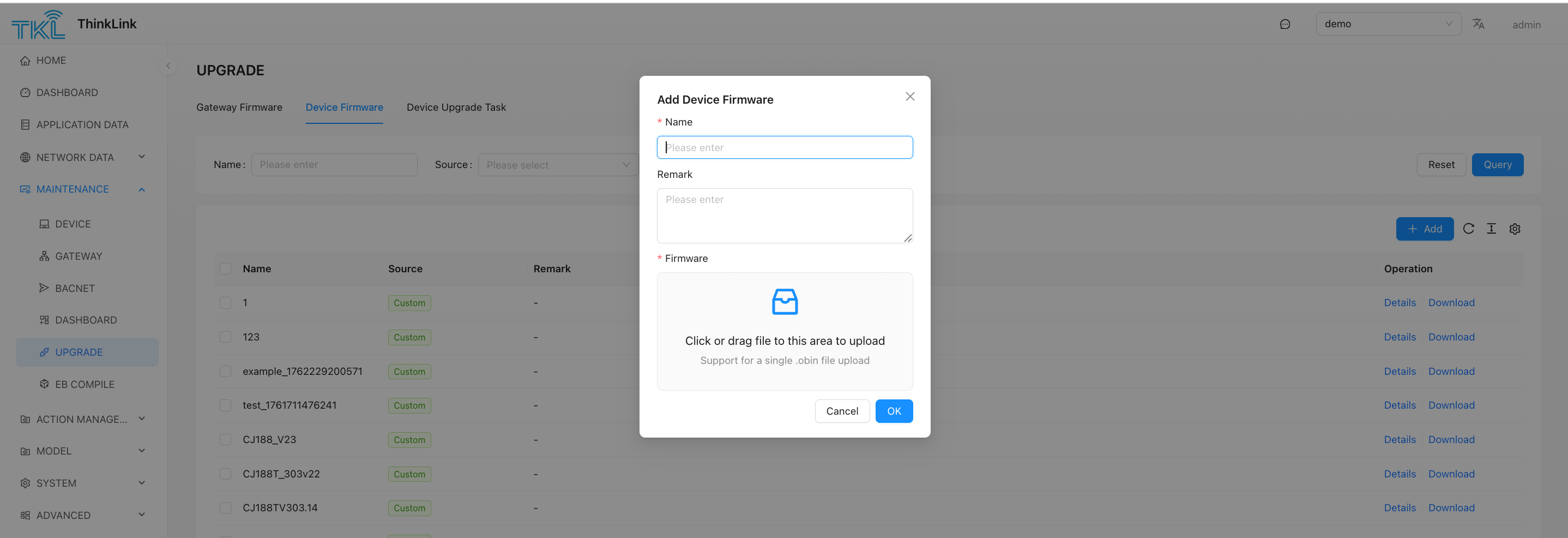
- Log in to ThinkLink → MAINTENANCE → UPGRADE.
- Under Device Firmware, click Add and upload the
.obinfile. - Create an upgrade task and select the target devices.
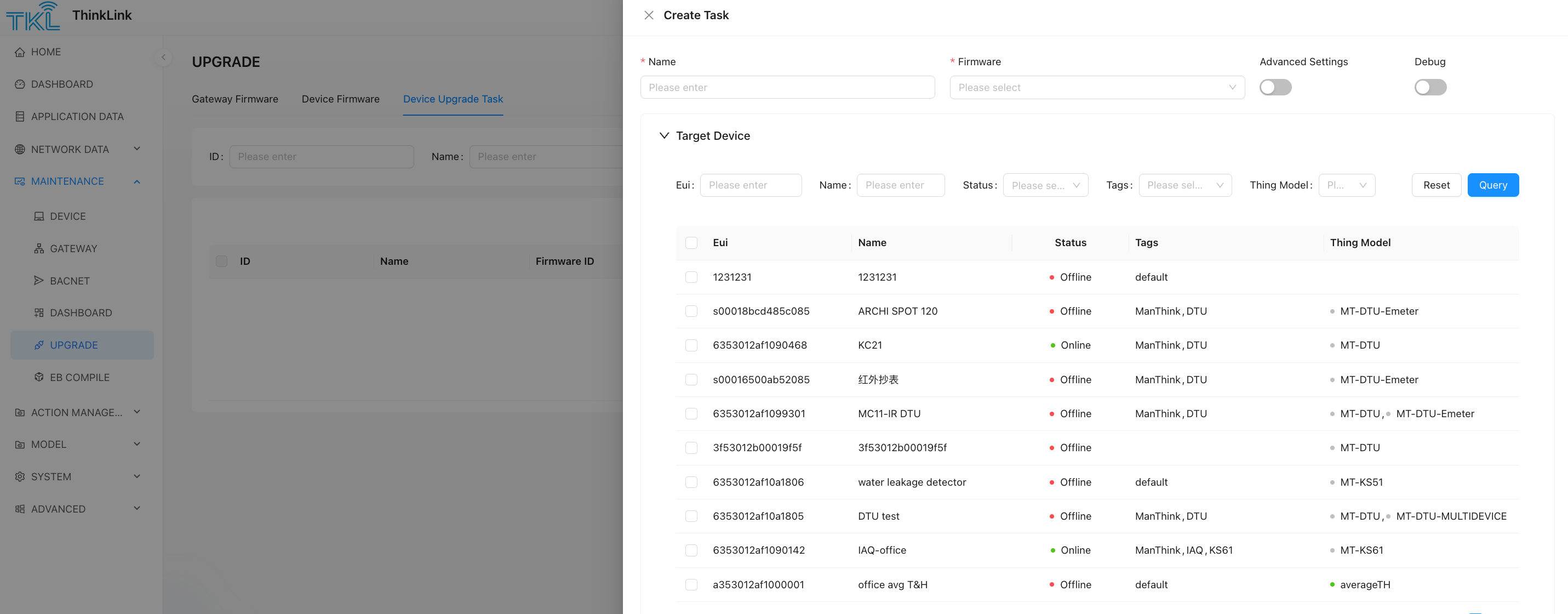
12.3 Upgrade Notes
- Set Max Retry Times to 1 and Packet Transmission Count to 1.
- Class A devices: an uplink from the device must occur first to open the RX window before each downlink packet can be delivered.
- Class C devices: use UNCONFIRMED packets. If the NS lacks automatic queueing, control timing manually based on over-the-air time. To improve reliability, send each packet 2–3 times (duplicates are filtered by EB).
- After a successful upgrade, the device resets automatically.
BzTypeandBzVersionin the compiled firmware must differ from the current device values; otherwise EB considers the firmware already installed and skips the upgrade.- Ensure
Battery: trueis set for battery-powered devices; omitting it causes the device to run in Class C mode and drains the battery.