KS51 Water Leakage Sensor V1.0
1. Product Introduction

2. Product Description
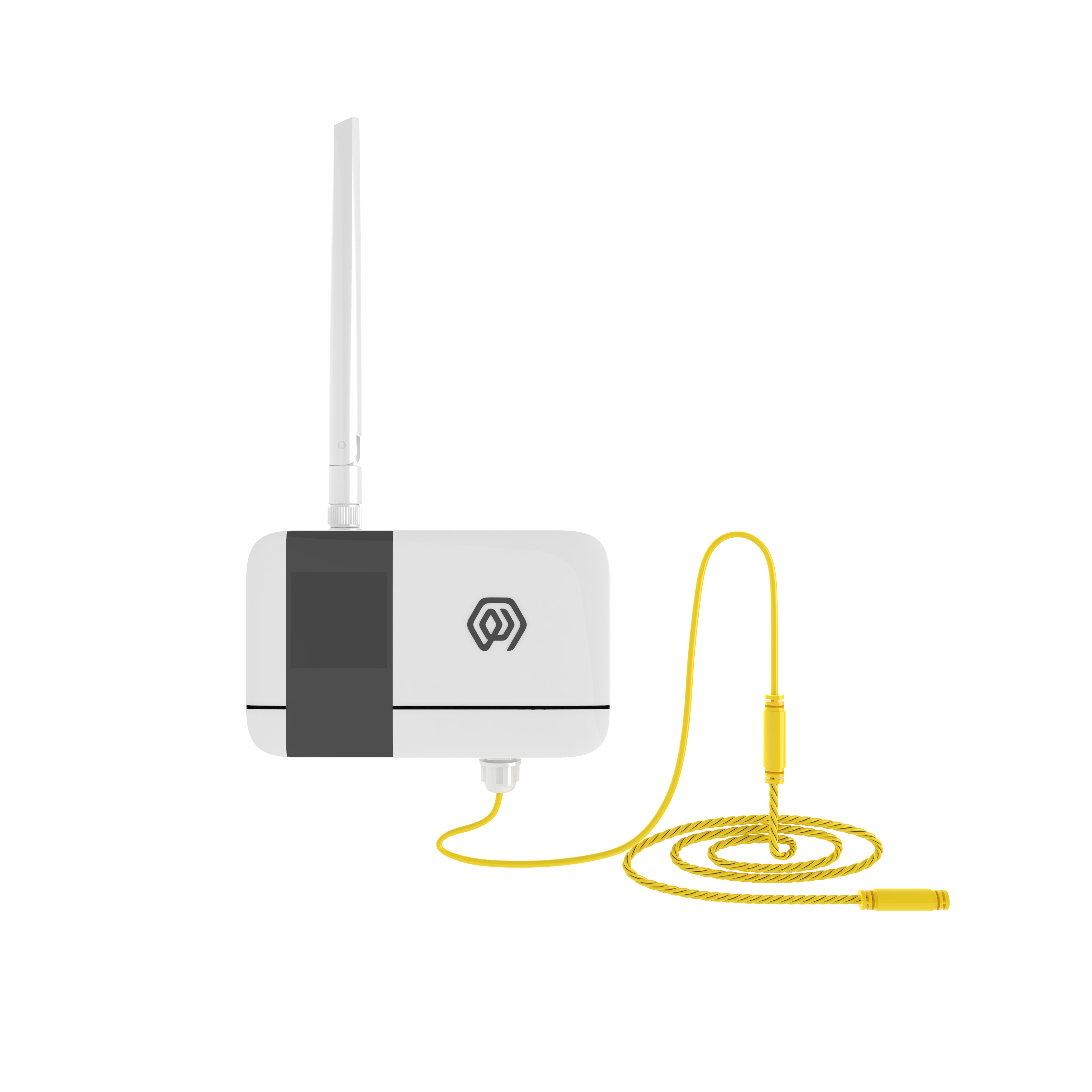
KS51 is a wireless water leakage detector sensor device, which monitors whether there is a water leakage event in the area monitored by the probe in real time through the sensor. When a water leakage event occurs, the alarm information is triggered and transmit to the application platform through LoRa signal.
KS51 periodically sends heartbeat information to ensure that the application platform monitors the status of the device in real time. The default configuration period is 3 hours. The user can set the sampling period and the heartbeat period through the palm machine or the management platform.
Supports LoRaWAN and LinkWAN protocols, IP65 protection level.
KS51 through real-time monitoring of flooding events, and alarm, the first time to inform the management of the flooding site for timely treatment, for storage, warehouse, factory and other events to protect, to avoid the loss of goods or equipment due to flooding events.
KS51 based on LoRa ® Wireless technology, supports standard LoRaWAN ® Networking communication has the characteristics of long communication distance and low power consumption. The product has 4 built-in 2700 mAh large-capacity lithium battery, the battery life is more than 8 years.
KS51 support with ManThink/3rd party LoRaWAN gateway, is combined with the ThinkLink/Chirp stack/TTN third-party Internet of Things platform to realize point-type and rope-type interfaces.
KS51 has a high protection level of IP65, which can be widely applied to the management requirements of smart industries, smart buildings and other scenarios.
3. Application Areas
- Warehousing and warehouse of logistics
- Data Center and Service Room
- Unattended factory, workshop
- Smart Home, Smart Building
4. Key Features
- Low battery voltage alarm
- Equipment failure alarm
- Support ThinkLink platform operation and maintenance
- LoRa modulation, receiving sensitivity up to-139dBm
- Standby power consumption <5uA
- High energy density lithium battery, to ensure that the product has a continuous working life of 8 years (3 hours heartbeat cycle)
- Support US902,AU915,AS923,EU868,EU433,CN470 LoRaWAN standard.
5. Parameters
| Item | Value |
|---|---|
| § Interface | |
| Connect Type | PG7, point/rope |
| Number of interfaces | 1 |
| Display | None |
| § Wireless Parameters | |
| Communication Protocol | Standard LoRaWAN ® Agreement |
| Regional Standards | CN470/EU433/EU868/AS923/AU915/Us902 |
| Transmit Power | Maximum Support 22dBm ( can be changed) |
| Receiving sensitivity | -142dBm(SF=12,BW=125kHz) |
| Working mode | OTAA/ABP Class A |
| § Configuration | |
| Test /Trigger mode | The magnet 2 seconds trigger heartbeat data 6 seconds trigger into the network |
| Parameter configuration | By NS issue instruction |
| § Physical Characteristics | |
| Power supply | 4*2700 mAh ER14505 lithium battery |
| Sleep current | <5uA (25 ℃ at room temperature) |
| Emission current | <110mA (22dBm transmit power) |
| Battery life | 8 years (3 hours heartbeat cycle, 25 ℃ at room temperature) |
| Working temperature | -40°C ~85°C |
| Relative humidity | ≤95% (no condensation) |
| Protection level | IP65 |
| Material & Color | ABS + PC, White |
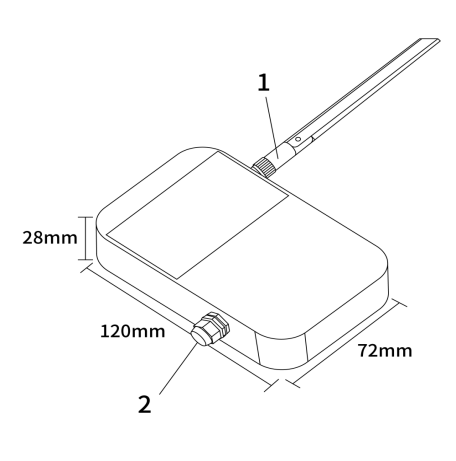
| Dimensions | 120mm * 72mm * 28mm |
| Installation method | Wall Hanging |
6. Dimensions and Interfaces
| No. | Interface |
|---|---|
| 1 | LoRa antenna interface |
| 2 | Point/rope sensor interface |
7. Product Model
7.1 Model example
KS518-A1-AS923-N
7.2 Model component breakdown
KS518: product series and RF band.KS51identifies a second-generation IP65 water-leak sensor.8identifies the 800 MHz-and-above RF version for EU868, AS923, AU915 and US902.- Other band option:
4identifies the 400 MHz RF version for EU433 and CN470.
-A1: sensor type and power configuration.Aidentifies point water-leak detection.- Other sensor option:
Bidentifies rope water-leak detection. 1identifies a built-in 10800 mAh battery.- Other power option:
2identifies external DC 5–24 V input.
-AS923: LoRaWAN regional standard.AS923means that the device supports the LoRaWAN AS923 regional parameters.- Other regional codes are
CN470,EU433,EU868,AU915andUS902;US902denotes the LoRaWAN US915 (902–928 MHz) regional parameters.
-N: default version.Nidentifies the default version.- Other values are reserved for customized or special versions.
7.3 Complete model meaning
The complete meaning of KS518-A1-AS923-N is:
This is a second-generation IP65 point water-leak sensor in the 800 MHz-and-above RF class. It includes a 10800 mAh battery, supports the LoRaWAN AS923 regional standard, and uses the default final version code N.
8. Network topology
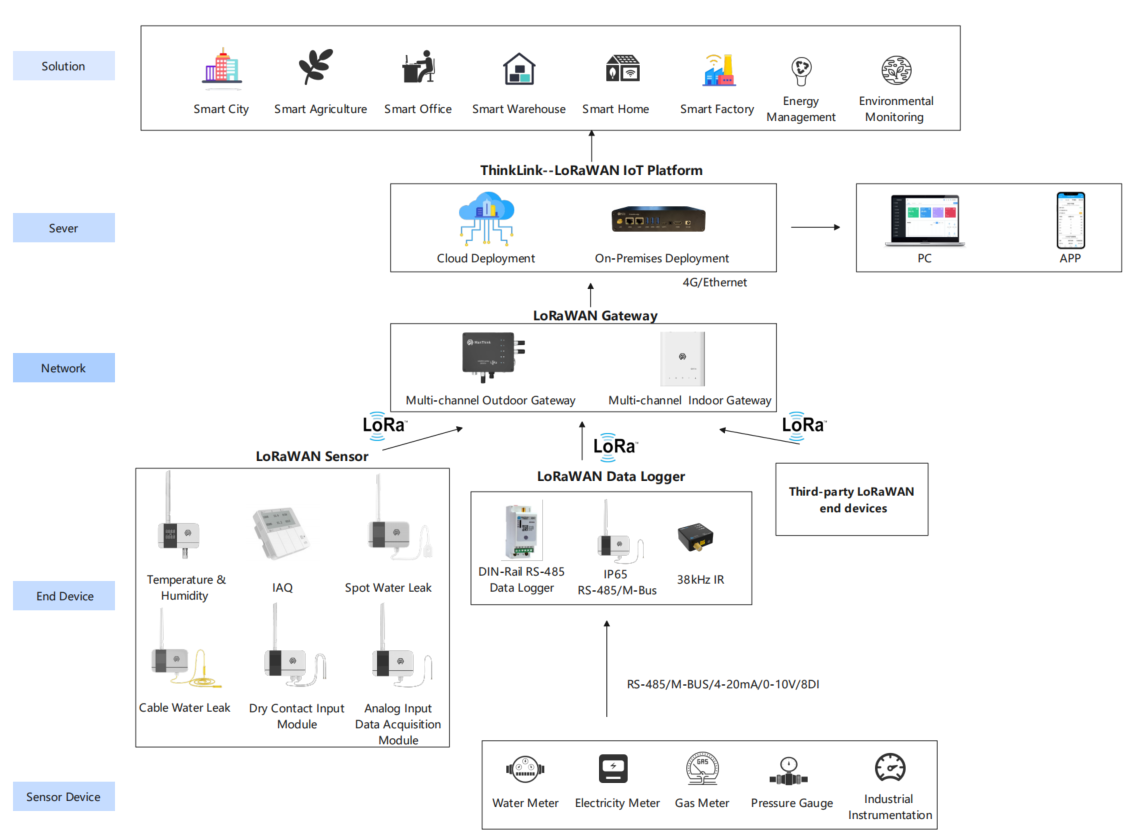
KS51 is a standard LoRaWAN device, KS51 normal operation requires LoRaWAN network support. You can use the LoRaWAN gateway of ManThink or the LoRaWAN gateway of a third party, and it needs the support of LoRaWAN NS. KS51 supports accessing standard LoRaWAN networks such as ThinkLink, Chirp stack, and TTN. You can use the ThinkLink configuration model to implement business functions, card view presentation, and other business logic.
The LoRaWAN network topology is as follows:
9. Working mode
9.1 Condition monitoring
- KS51 continuously monitors the water leakage status,
- Upload alarm information after leakage event.
- After transmit the alarm information, enter the protection mechanism and no alarm will be given within 1 minute.
- 1 minute after the alarm, the detection probe level status will upload information again if there is no water leakage
_Note: It is impossible to detect the leakage state of non-conductive liquids, such as organic solvents, purified water, etc. _
9.2 Periodic heartbeat
The format of the heartbeat protocol is the same as that of the heartbeat trigger protocol, and the heartbeat period can be set by issuing instructions through NS.
9.3 Communication Test
Use a magnet to stick a two-dimensional code on KS51 to trigger 2s-4S, which can trigger a packet of upstream measurement data.
9.4 Network access
Use a magnet to stick a two-dimensional code on KS51 to trigger 6s-8s, which can trigger a packet of network access data.
10. Installation Instructions
10.1 Single point type water immersion installation diagram:
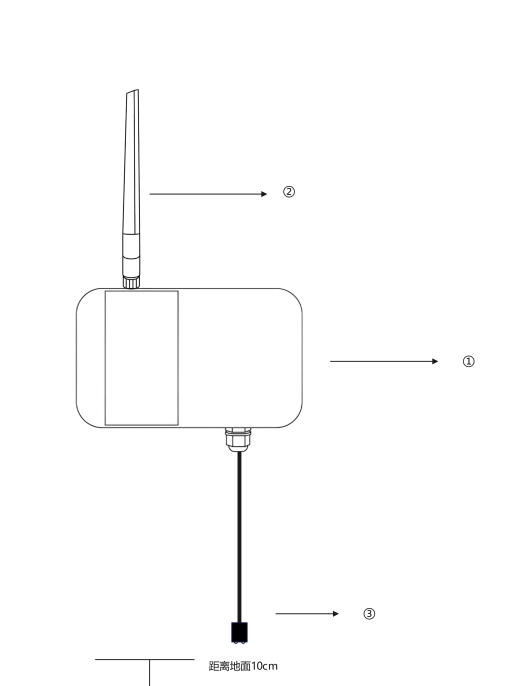
① Hang the water detector sensor vertical wall on the wall, and the back of the water leakage sensor is installed with a back plate for fixing.
② Tighten the LoRa antenna
③ The root of the water immersion probe shall be closely attached to the wall surface with double-sided adhesive, and the height from the ground shall be 10cm.
_Note: Please ensure that the installation is covered by the Gateway when leakage _
10.2 Rope type water immersion installation diagram:
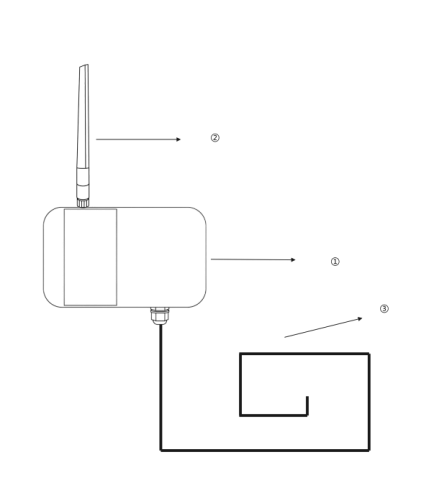
① Hang the water leakage vertical wall on the wall, and the back of the water leakage sensor is equipped with a back plate for fixing.
② Tighten the LoRa antenna
③ Water leakage detection extension rope
preparation tools: Impact drill, drill bit, Phillips screwdriver, Buckle
use an electric drill to drill holes in the installation position in advance. The left and right sides of the water leakage detector will be equipped with installation holes, which will be fixed by screws. Then connect the extension cord, and use the buckle to fix the extension cord at the position where the water leakage needs to be monitored.
11. According to the standard
\PTL-D01 ManThink Technology IoT Terminal Application Layer General Protocol V1.5
12. Data Items and Identifiers
- [x] LoRaWAN port number = 11
KS51 supports only one data format and sends data periodically according to a set period. When a flooding event occurs, it triggers one frame of uplink data.
Example (hex):82 21 12 00 F1 50 06
| Number | Data Item | Example | Start Address | Length | Description |
|---|---|---|---|---|---|
| 1 | Version number | 0x82 | 0 | 1 byte | Fixed at 0x82 |
| 2 | Control word | 0x21 | 1 | 1 byte | Fixed at 0x21 |
| 3 | Identifier | 0x12 | 2 | 1 byte | Fixed at 0x12 |
| 4 | Status | 0x00 | 3 | 1 byte | 0x00: dry; 0x01: water detected |
| 5 | Battery voltage | 0xF1 | 4 | 1 byte | Actual value = sample × 1.6 / 254 + 2 V |
| 6 | RSSI | 0x50 | 5 | 1 byte | Actual value = reported value - 160 dBm |
| 7 | SNR | 0x06 | 6 | 1 byte | uint8, unit: dB |
13. ThinkLink reference model
Log in to https://thinklink.manthink.cn\n○ Search for KS51 in the model menu\n○ add using template KS51
14. Parameter modification
\PTL-D01 ManThink Technology IoT Terminal Application Layer General Protocol V1.5
14.1 Configuration parameter address table
| Number | data Item | default Value | start Address | length | description |
|---|---|---|---|---|---|
| 1 | upload period | 900 | 40 | 4 bytes | upload period, in seconds |
15. Contact Us
Website: www.manthink.cn
Email: info@manthink.cn
Tel: +86 15810684257
16. Manual Downloads
PUBLIC integration models
Select MT-KS51 and check the models and RPCs below. Confirm parameter changes from fresh device feedback; Class A operations wait for receive windows. Template defaults do not establish the current configuration of existing devices.
Model catalog
| Model type | Name | id_name | Platform model ID |
|---|---|---|---|
| Template | MT-KS51 | 2 | |
| Thing Model | [MT KS51 PARA] | mt_ks51_para | 93453960316194821 |
| Thing Model | [MT-KS51] | mt_ks51 | 24195523346960389 |
| RPC | [MT KS51 SET] para | mt_ks51_set_para | 93456530862510085 |
| RPC | [MT KS51 GET] para | mt_ks51_get_para | 93456915341774853 |