1. AS Data
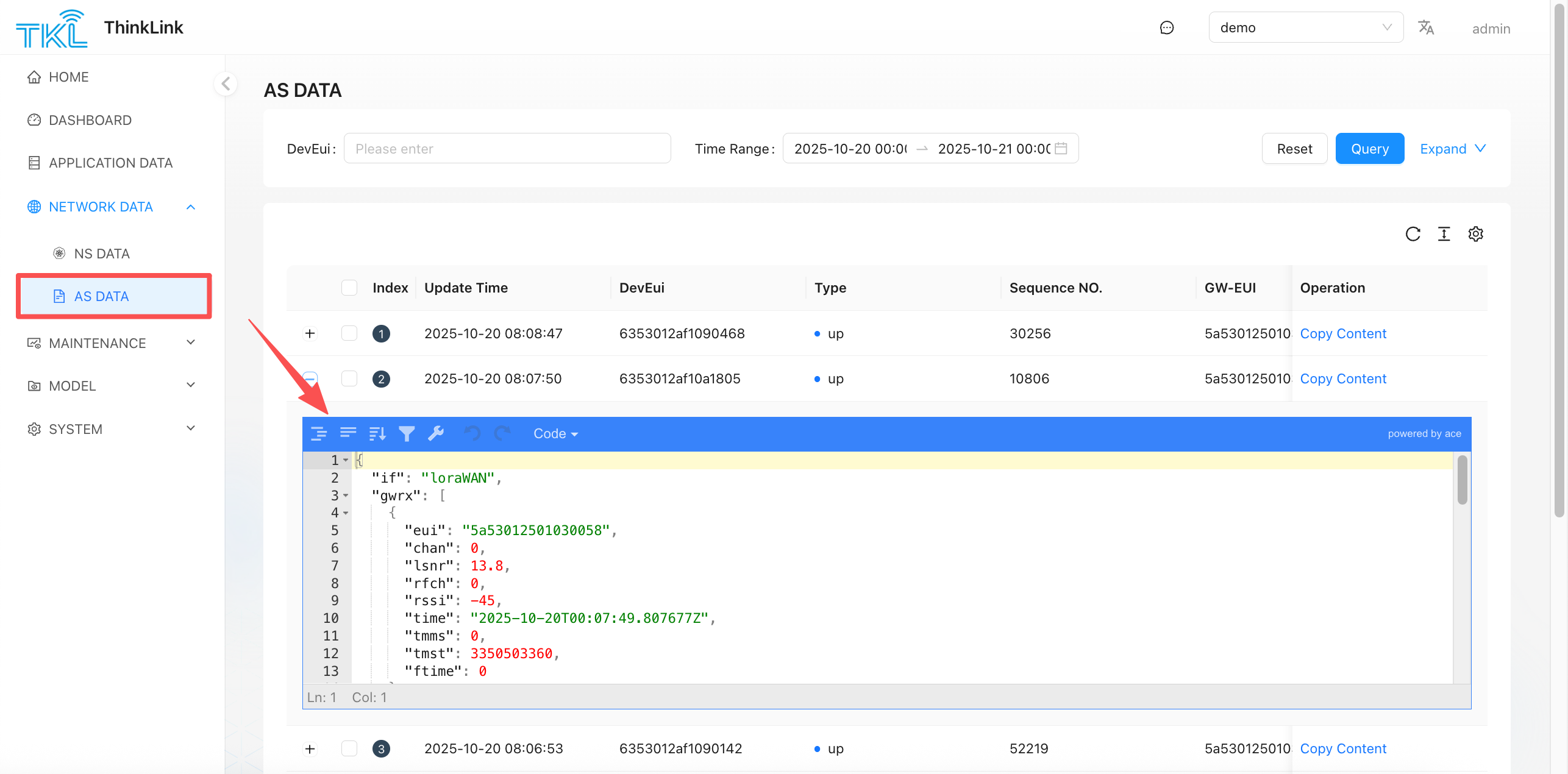
AS Data is the structured application-layer payload output after the NS decrypts and deframes the LoRaWAN packet. The userdata.payload is still Base64-encoded, but LoRaWAN encryption has been removed. This layer sits between the raw device transmission and ThinkLink thing-model parsing — it is the right place to tap into for custom protocol handling or third-party platform integration.
Data Flow
flowchart LR
    DEV[LoRaWAN Device]:::dim
    GW[Gateway]:::dim
    NS[NS Data\nRaw MAC frames]:::dim
    AS[AS Data\nDecrypted structured payload]:::highlight
    RT[Realtime Data\nThing-model values]:::dim
    HIS[Historical Data\nTime-range archive]:::dim

    DEV -->|Radio signal| GW
    GW -->|SEMTECH UDP| NS
    NS -->|LoRaWAN decrypt| AS
    AS -->|Thing model parser| RT
    RT -->|Persist| HIS

    classDef highlight fill:#1a6fcf,color:#fff,stroke:#1a6fcf
    classDef dim fill:#f0f0f0,color:#888,stroke:#ddd
You are here: AS Data is decrypted but not yet parsed by a thing model. If you need values like temperature or humidity, go to Realtime Data.
The AS Data format follows the PTL-S05 ASP LoRaWAN NS and Application Server Communication Protocol.
1.1. Uplink Example (up)
{
  "if": "loraWAN",
  "gwrx": [
    {
      "eui": "5a53012501030056",
      "chan": 0,
      "lsnr": 14.2,
      "rfch": 0,
      "rssi": -21,
      "time": "2025-09-24T07:07:03.807677Z",
      "tmms": 0,
      "tmst": 1152383989,
      "ftime": 0
    }
  ],
  "type": "data",
  "token": 56368,
  "moteTx": {
    "codr": "4/5",
    "datr": "SF7BW125",
    "freq": 470.9,
    "modu": "LORA",
    "macAck": "",
    "macCmd": ""
  },
  "geoInfo": {
    "type": "gw:wifi",
    "accuracy": 50,
    "altitude": 0,
    "latitude": 34.19863,
    "longitude": 108.86273
  },
  "moteeui": "6353012af1090498",
  "version": "3.0",
  "userdata": {
    "port": 11,
    "class": "ClassA",
    "seqno": 27464,
    "payload": "IQcDDG4BAADaBB0C538J",
    "confirmed": false
  }
}| Field | Description |
|---|---|
moteeui | EUI of the reporting device |
gwrx | List of gateways that received this frame, with per-gateway RSSI/SNR |
userdata.payload | Base64-encoded raw business payload — needs thing-model parsing |
userdata.port | FPort — identifies the data type or function channel |
userdata.seqno | Device frame sequence number (use for retransmission / packet-loss analysis) |
geoInfo | Gateway geographic coordinates (for location-aware applications) |
1.2. Downlink Example (dn)
{
  "dn": {
    "if": "loraWAN",
    "type": "data",
    "token": 1758686562078,
    "moteeui": "6353012af1099301",
    "version": "3.0",
    "userdata": {
      "port": 51,
      "type": "data",
      "fpend": false,
      "payload": "/mgSBgNWBQZoHBA1MzMzMzMzM04zAAAAAAAAABY=",
      "dnWaitms": 3000,
      "TxUTCtime": "",
      "confirmed": false,
      "intervalms": 0
    }
  }
}| Field | Description |
|---|---|
moteeui | Target device EUI |
userdata.port | FPort — 51 is typically used for parameter configuration commands |
userdata.payload | Base64-encoded command payload |
userdata.dnWaitms | Maximum wait time for the device downlink window (ms) |
userdata.confirmed | Whether the device must ACK this downlink |
1.3. When to Use AS Data
| Scenario | Why AS Data helps |
|---|---|
| Custom protocol parsing | Payload is already decrypted — apply your own parser |
| Third-party platform integration | Subscribe to the AS MQTT topic and forward in real time |
| Confirm a downlink was scheduled by NS | Check whether a dn record appears |
| Debug a thing-model parser | Compare the raw AS payload with the Realtime Data output |
MQTT subscription: Subscribe to
/v32/{tenant}/as/up/data/#for uplink and/v32/{tenant}/as/dn/data/#for downlink to receive AS Data in real time. See ThinkLink Protocol for topic rules.
1.4. Common FPort Usage
The userdata.port field (FPort) identifies the business channel on the device. Common conventions:
| FPort | Purpose |
|---|---|
| 51 | Transparent passthrough — raw bytes forwarded as-is, no protocol wrapping |
| 201 | OTA firmware upgrade |
| 209 | Heartbeat — used to confirm the device is alive |
| 214 | Parameter configuration and readback (downlink writes a parameter; uplink returns the current value) |
These are common port conventions used by vendor devices. For third-party standard LoRaWAN devices, refer to the device's own documentation for port definitions.
1.5. Troubleshooting
When data is not arriving, trace the chain layer by layer:
Step 1: Confirm the gateway is online
Go to Operation Management → Gateway Management and check that the gateway shows online.
If the gateway is offline, no data can reach any downstream layer. Resolve the gateway connection before checking anything else.
Step 2: Check NS Data for uplink packets
Go to Network Data → NS Data and search as follows:
| Case | Search field | Reason |
|---|---|---|
| Device has never joined, or just reset | DevEUI | Join Request / Join Accept frames are identified by DevEUI — no DevAddr exists yet |
| Device already joined, sending data | DevAddr | After joining, all data frames use the dynamically assigned DevAddr, not DevEUI |
- No NS data: The device's signal is not reaching the gateway, or the gateway is not connected to the NS. Check radio coverage or gateway logs.
- NS data exists: Continue to Step 3.
Step 3: Check AS Data to confirm decryption succeeded
Go to Network Data → AS Data and search using the same DevEUI or DevAddr.
| Symptom | Likely cause | Fix |
|---|---|---|
| NS has data, AS is empty | LoRaWAN keys mismatch (AppKey / AppSKey / NwkSKey) | Verify the keys in the device profile exactly match those flashed on the device |
| NS has data, AS is empty | Device profile missing or enable is false | Add a LoRaWAN profile in Device Management and confirm enable is on |
| AS has data | Decryption succeeded — continue to Step 4 | — |
Step 4: Confirm the thing model is correctly configured
Go to Application Data → Realtime Data and check for parsed business values.
| Symptom | Likely cause | Fix |
|---|---|---|
| AS has data, Realtime Data is empty | No thing model assigned to the device | Assign a thing model in Model Management |
| AS has data, Realtime Data is empty | Thing model parser script has errors | Open the thing model editor and debug the parser using the payload from AS Data |
| AS has data, some Realtime fields are empty | Parser does not cover that FPort or field | Check the parser logic for the relevant port branch |