1. Template
A Template bundles multiple models and configuration presets into a reusable set. When adding a device individually or importing devices in bulk, you can select a template and apply all bound models and default settings in one step — eliminating repetitive manual configuration.
1.1. Creating a Template
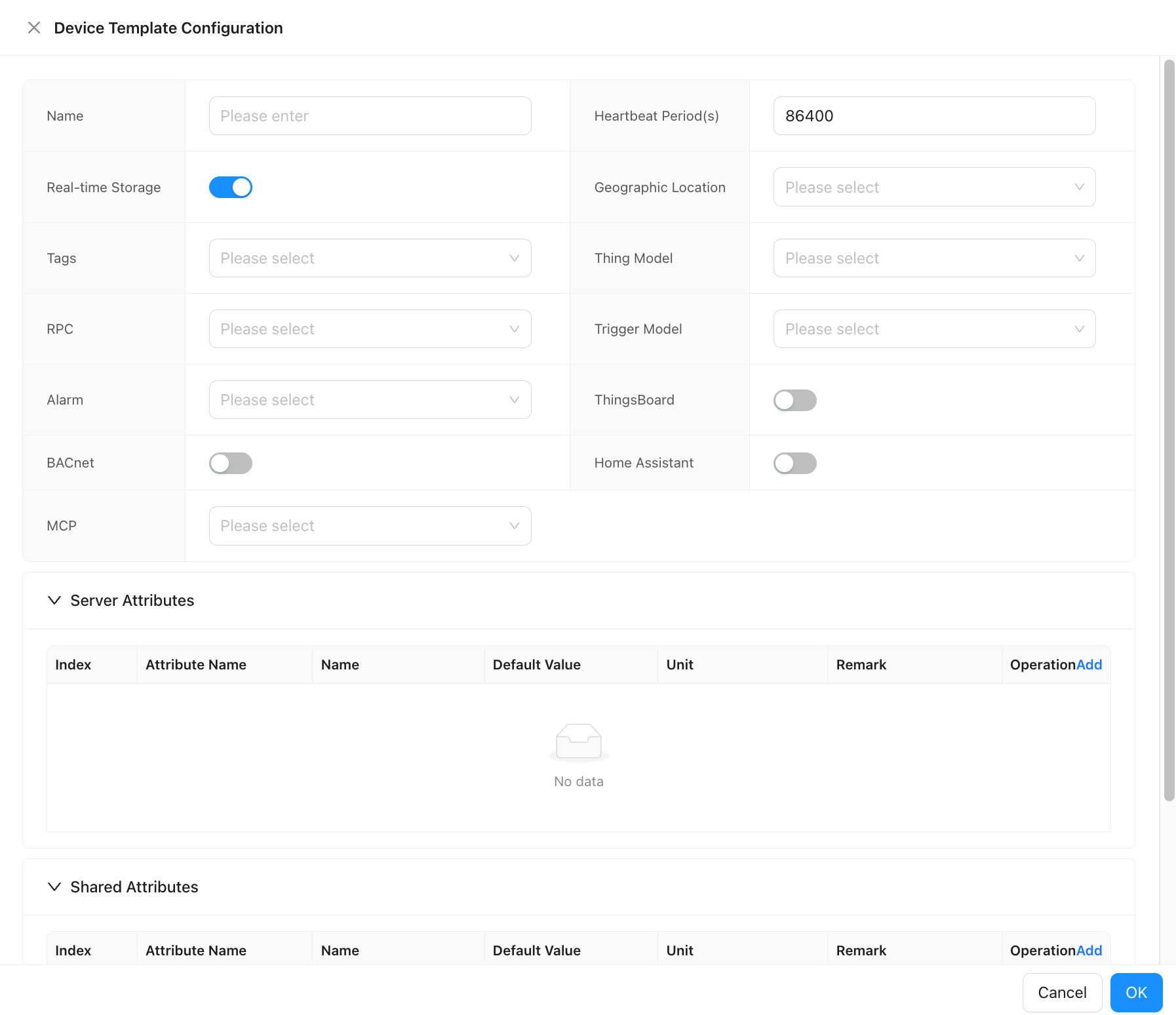
Open Model → Template and click Add. The configuration dialog contains the following sections.
1.1.1. Basic Configuration
| Field | Description |
|---|---|
| Name | A unique display name for the template. |
| Heartbeat Period (S) | Expected heartbeat interval in seconds. Default: 86400 (24 h). Used for device online/offline detection. |
| Real-time Storage | Select the real-time data storage policy to apply to devices using this template. |
| Geographic Location | Bind a geographic location to devices created from this template. |
| Tags | Assign one or more tags. Tags are inherited by devices created from this template and can be used for filtering. |
1.1.2. Model Binding
| Field | Description |
|---|---|
| Thing Model | Select the thing model that defines the data points and properties for devices using this template. |
| Trigger Model | Select a trigger model to apply event-driven logic to all devices created from this template. |
| RPC | Bind an RPC configuration so that the corresponding remote commands are available on all devices. |
1.1.3. Integration Options
The following integrations can be enabled and pre-configured within a template. When a device is added using this template, the selected integrations are automatically applied.
| Field | Description |
|---|---|
| ThingsBoard | Configure ThingsBoard data forwarding. |
| Alarm | Bind an alarm configuration. |
| BACnet | Enable BACnet integration settings. |
| Home Assistant | Enable Home Assistant integration settings. |
| MCP | Enable MCP-related options. |
1.2. Attribute Configuration
Templates support two types of pre-defined attributes that are automatically applied to devices created from the template.
Server Attributes
Server attributes are stored and managed on the platform side. They are typically used for device identification, configuration parameters, or metadata that the server controls.
| Column | Description |
|---|---|
| Index | Auto-incremented row number. |
| Name | Display name of the attribute. |
| Attribute Name | The key used in the data model and API. |
| Unit | Optional unit label (e.g., °C, kWh). |
| Default Value | The initial value applied when a device is created using this template. |
| Remark | Optional description or notes. |
Click Add in the Server Attributes section to add a new row.
Shared Attributes
Shared attributes can be read by both the platform and the device. They are typically used for configuration values that may be pushed down to the device (e.g., reporting interval, threshold settings).
The column structure is identical to Server Attributes.
After setting attributes in a template, these attributes can also be referenced within the associated Thing Model. When a device is created using this template, all pre-defined server attributes and shared attributes are automatically added to that device.
1.3. Using a Template
Adding a Single Device
When adding a new device, select a template from the Template dropdown in the device creation form. All models, integrations, and default attribute values defined in the template are applied immediately upon saving.
Bulk Import
When importing devices via CSV or batch import, you can specify a template name in the import file or select a template in the import dialog. All devices in the batch will share the same model bindings, integration settings, and default attribute values defined by the selected template.