1. Realtime Data
Realtime Data shows the thing-model-parsed business values — temperature, humidity, voltage, and so on — with one row per device reflecting its most recent uplink. This is the data view most users interact with day-to-day.
Data Flow
flowchart LR
    DEV[LoRaWAN Device]:::dim
    GW[Gateway]:::dim
    NS[NS Data\nRaw MAC frames]:::dim
    AS[AS Data\nDecrypted structured payload]:::dim
    RT[Realtime Data\nThing-model values]:::highlight
    HIS[Historical Data\nTime-range archive]:::dim

    DEV -->|Radio signal| GW
    GW -->|SEMTECH UDP| NS
    NS -->|LoRaWAN decrypt| AS
    AS -->|Thing model parser| RT
    RT -->|Persist| HIS

    classDef highlight fill:#1a6fcf,color:#fff,stroke:#1a6fcf
classDef dim fill:#f0f0f0,color:#888,stroke:#dddPrerequisite: Realtime Data requires a thing model to parse the payload. If no thing model is assigned to the device, or the parser returns nothing, this view will be empty.
1.1. Interface Overview
Each row represents a device's most recent uplink. Columns correspond to the property fields defined in the thing model.
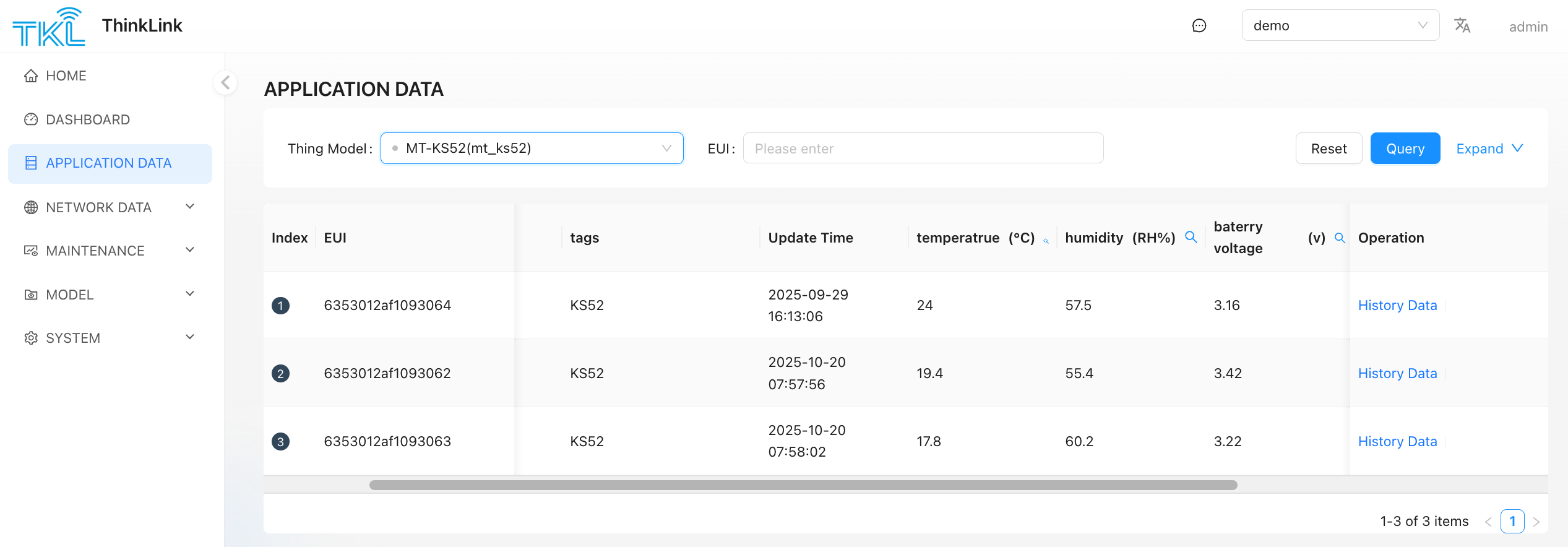
Click History Data at the end of any device row to jump to that device's historical record query page.
1.2. Empty Data — Troubleshooting
| Symptom | Likely cause | Fix |
|---|---|---|
| List is completely empty | No thing model assigned | Assign a thing model to the device in Thing Model Management |
| Device appears but all values are blank | Thing model parser returns nothing | Check the parser script; verify the payload format in AS Data |
| Values not updating | Device offline or weak signal | Confirm uplink packets in NS Data |
| Data exists but can't find the device | Wrong thing model selected in filter | Check the Thing Model dropdown at the top of the page — select the correct model or switch to "All" |
1.3. Telemetry Data vs. Device Parameter Data
The realtime data view contains two categories of fields, distinguished by their naming convention:
| Data type | Field name pattern | Description |
|---|---|---|
| Telemetry data | No PARA in the name — e.g. TEMPERATURE, HUMIDITY, VOLTAGE | Business measurement values actively reported by the device on each uplink |
| Device parameter data | Contains PARA — e.g. PARA_REPORT_INTERVAL, PARA_THRESHOLD | Current device configuration values, updated only when the device responds to a parameter read command (FPort 214) |
Common mistake: It is normal for PARA fields to stay unchanged for long periods — parameter values only update when a configuration command is sent and the device replies. If you are looking for the latest sensor readings, focus on fields that do not contain
PARA.