Plugin
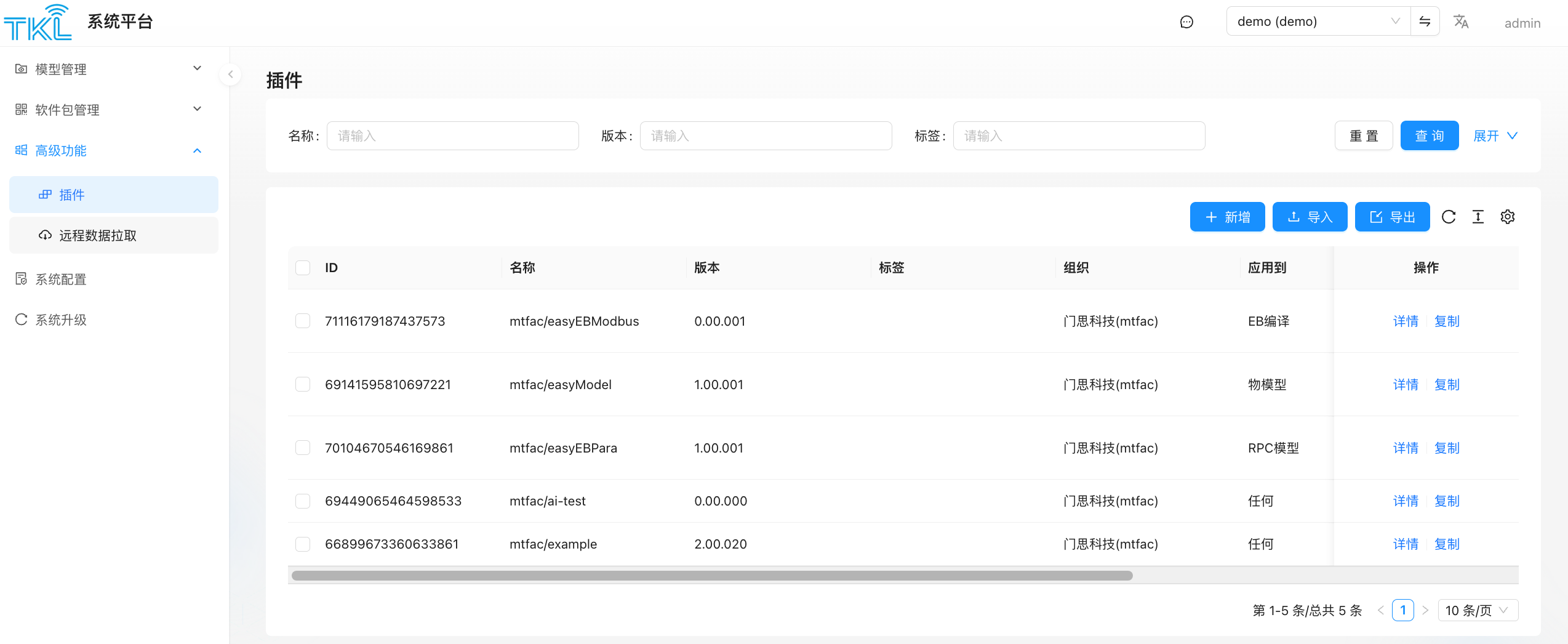
System Platform → Advanced → Plugin manages system-level (PUBLIC) plugins. These are helper code snippets that can be referenced from thing-model editors, RPC-model editors, the EB compiler, and so on.
What Is a Plugin
A plugin is a namespaced helper-code package, named like mtfac/easyEBModbus, mtfac/easyModel, or mtfac/easyEBPara. Plugins shown on the System Platform always have tenant_code = PUBLIC, so every tenant can use them.
Column Reference
| Field | Meaning |
|---|---|
| ID | Plugin record ID |
| Name | Full name including org prefix, e.g. mtfac/easyEBModbus |
| Version | Plugin version number |
| Tag | Custom tag, useful for search |
| Org | Namespace, e.g. ManThink Tech (mtfac) |
| Apply To | Where the plugin can be referenced: EB Compiler / Thing Model / RPC Model / Any |
Actions
| Button | Effect |
|---|---|
+ Add | Open the Plugin Configuration dialog to create a new plugin |
Import | Bulk-import plugins from an Excel file |
Export | Export the current list to Excel |
Details (row) | View / edit a plugin's full content |
Copy (row) | Create a new plugin using an existing one as the template |
| Batch Delete | Select rows, then delete from the toolbar |
Plugin Configuration Dialog
When adding or editing a plugin, the dialog has two tabs:
UI Config tab
| Field | Description |
|---|---|
| Name | Plugin name including org prefix, e.g. mtfac/easyEBModbus |
| Plugin Version | Semantic version string, e.g. 0.00.001 |
| Apply To | Scope: ANY / EB Compiler / Thing Model / RPC Model |
| Tags | Free-text tags for search |
| Default Env Variable | JSON object ({}) — default environment variables injected when the plugin is imported |
| UI Config | JSON defining a form schema ({"formConfig":[]}) — renders a configuration UI when the plugin is used in an editor. The Preview panel on the right shows the rendered form in real time |
JSON Config tab
Raw JSON view of the full plugin definition. Useful for copy-paste import or direct editing of complex plugin structures.
Typical Workflows
- Publish reusable Modbus-parsing snippets, unit-conversion helpers, etc. as system-level plugins so every tenant can
importthem in their own thing models / RPC models. - Plugins pulled in via Remote Data Pull land in this list automatically.