1. NS Data
NS Data is the lowest-level raw data in ThinkLink — it records the LoRaWAN MAC-layer frames exchanged between the gateway and the NS, including full physical-layer parameters (RSSI, SNR, frequency, etc.) and the encrypted device payload. Use NS Data for deep debugging, network performance analysis, and radio coverage evaluation.
Data Flow
flowchart LR
    DEV[LoRaWAN Device]:::dim
    GW[Gateway]:::dim
    NS[NS Data\nRaw MAC frames]:::highlight
    AS[AS Data\nDecrypted structured payload]:::dim
    RT[Realtime Data\nThing-model values]:::dim
    HIS[Historical Data\nTime-range archive]:::dim

    DEV -->|Radio signal| GW
    GW -->|SEMTECH UDP| NS
    NS -->|LoRaWAN decrypt| AS
    AS -->|Thing model parser| RT
    RT -->|Persist| HIS

    classDef highlight fill:#1a6fcf,color:#fff,stroke:#1a6fcf
    classDef dim fill:#f0f0f0,color:#888,stroke:#ddd
You are here: NS Data is the first layer after radio reaches ThinkLink. The payload is still encrypted. If you only need business values like temperature or humidity, go directly to Realtime Data.
1.1. Data Format
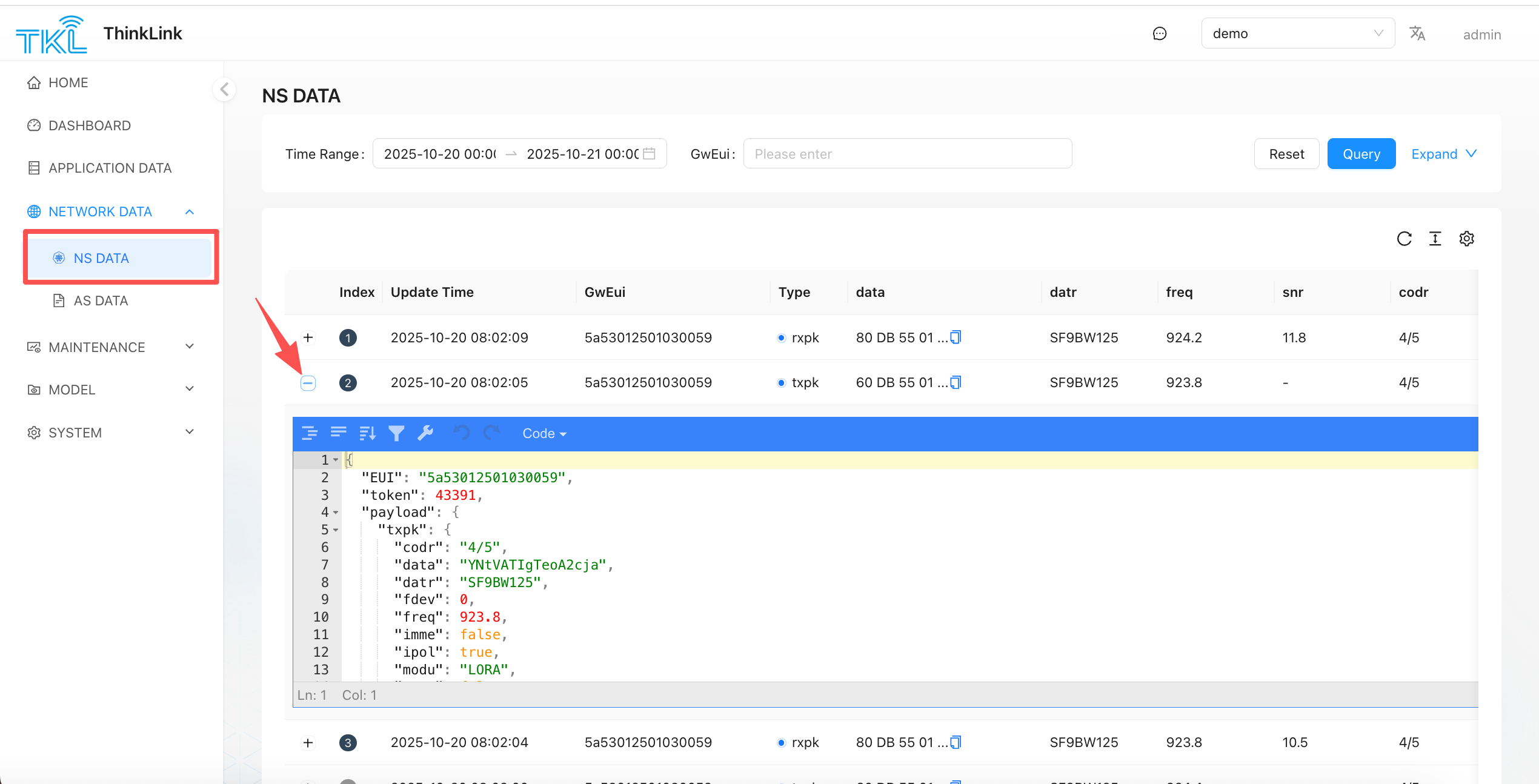
NS Data is served in JSON. There are two packet types: uplink (rxpk) and downlink (txpk).
Uplink (rxpk)
{
  "EUI": "5a53012501030011",
  "token": 35160,
  "payload": {
    "rxpk": {
      "mid": 8,
      "chan": 4,
      "codr": "4/5",
      "data": "QKg6ATAAQ2sL/g+03laRsIW5iqvAAD0TohUdGw==",
      "datr": "SF7BW125",
      "foff": 9,
      "freq": 471.1,
      "jver": 1,
      "lsnr": 12,
      "modu": "LORA",
      "rfch": 1,
      "rssi": -95,
      "size": 28,
      "stat": 1,
      "time": "2025-09-24T07:02:03.802672Z",
      "tmst": 2379579148,
      "rssis": -96
    }
  },
  "version": 2,
  "identifier": 0
}| Field | Description |
|---|---|
EUI | EUI of the receiving gateway |
rxpk.rssi | Received signal strength (dBm) — closer to 0 is better |
rxpk.lsnr | Signal-to-noise ratio (dB) — higher positive value is better |
rxpk.freq | Uplink frequency (MHz) |
rxpk.datr | Spreading factor and bandwidth, e.g. SF7BW125 |
rxpk.data | Base64-encoded encrypted LoRaWAN payload |
rxpk.time | Gateway receive timestamp (UTC) |
Downlink (txpk)
{
  "EUI": "5a53012501030011",
  "token": 52914,
  "payload": {
    "txpk": {
      "codr": "4/5",
      "data": "YKg6ATIm+AkNqlP+VU6cdZ50",
      "datr": "SF7BW125",
      "fdev": 0,
      "freq": 501.5,
      "imme": false,
      "ipol": true,
      "modu": "LORA",
      "ncrc": false,
      "powe": 22,
      "prea": 8,
      "rfch": 1,
      "size": 18,
      "time": "",
      "tmms": 0,
      "tmst": 760845965
    }
  },
  "version": 2,
  "identifier": 3
}| Field | Description |
|---|---|
txpk.freq | Downlink frequency (MHz) |
txpk.powe | Transmit power (dBm) |
txpk.data | Base64-encoded downlink payload |
txpk.tmst | Target send timestamp (aligned to device receive window) |
1.2. LoRaWAN Frame Decoder
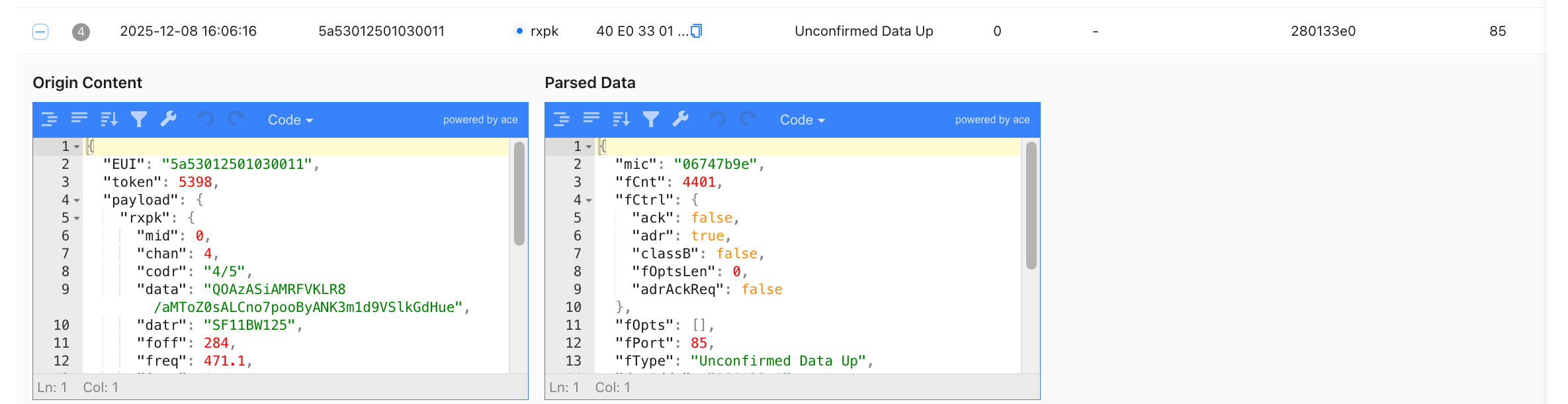
Click + next to any row to expand the LoRaWAN protocol-layer decode view, showing MIC verification, frame counter, ADR flag, and other MAC-layer fields. Useful for diagnosing Join failures and frame counter anomalies.
1.3. When to Use NS Data
| Scenario | Why NS Data helps |
|---|---|
| Device can't Join | Check whether a Join Request uplink exists |
| Signal quality evaluation | Read RSSI / SNR per gateway |
| Frame counter anomaly | Expand decoder to inspect FCNT |
| Confirm downlink reached gateway | Check whether a txpk entry appears |
Note: The
datafield in NS Data is the encrypted raw payload. To read decrypted structured content, go to AS Data.
1.4. Search Tips
Choose the right search field based on the device's current state:
| Device state | Recommended search field | Reason |
|---|---|---|
| Never joined, or just reset | DevEUI | Join Request and Join Accept frames are identified by DevEUI — no DevAddr exists yet |
| Already joined, sending data | DevAddr | After joining, all data frames use the dynamically assigned DevAddr |
For the full data-reception troubleshooting flow (gateway online → NS → AS → Realtime Data), see AS Data → Troubleshooting.