1. EBCompiler
EB (EdgeBus) is a virtual machine running on low-power MCUs. EB enables complex sensor integration through programming with TypeScript. For a detailed introduction to EB, please refer to EB compiler SDK instructions
ThinkLink provides an EB cloud compilation platform, allowing users to input TypeScript code and compile it online into an obin file for device firmware updates.
Use EBHelper to simplify development
Writing raw EB expressions requires deep knowledge of the SDK internals and is error-prone. EBHelper is the official "configuration-as-code" toolkit — fill in a JSON-style
UserConfUPItemconfiguration and it generates query events, uplink events, COV threshold allocation, CRC rules and the full uplink frame layout automatically. Supports Modbus RTU, DL/T 645-2007, and CJ/T 188 out of the box.
- Documentation: EBHelper Reference
- Code examples: EBHelper Example Codes
- Source:
source/EBSDK/EBCompiler/plugins/EBHelper.ts
1.1. Add New EB Code
- Note 1: Unlike using the SDK, the
mainfunction definition and execution are already built into the cloud compilation system. Therefore, you must exclude themainfunction from your code. - Note 2: Each EB code must have a unique combination of
BzTypeandBzVersion. Duplicated combinations will result in device upgrade failures. - Note 3: The
SwVersionmust match the firmware version of the target device. The current latest EB version is 31.
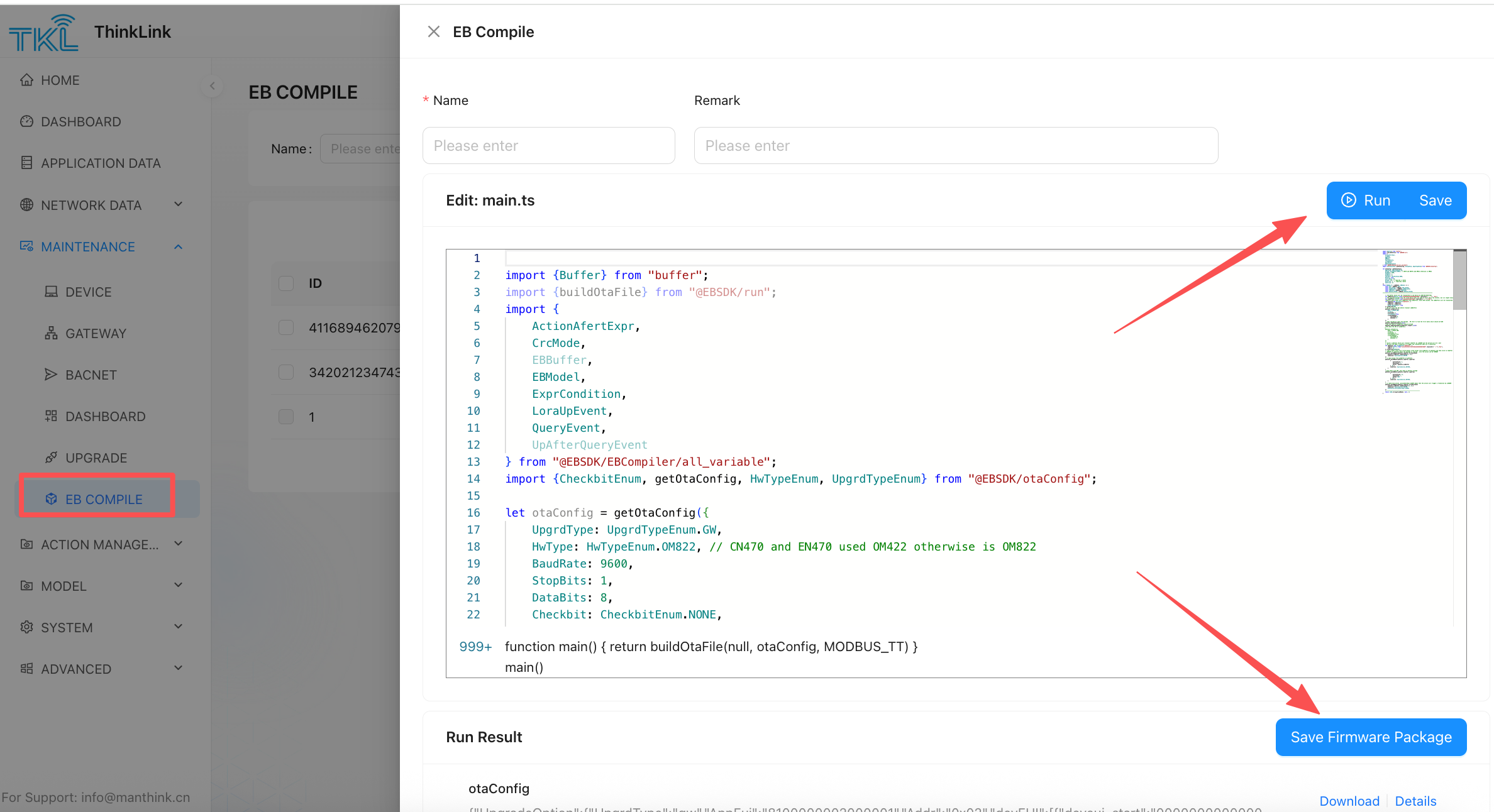
[ 1 ] After clicking "Add", the system will generate a default code template. Replace the sample code with your own implementation.
[ 2 ] Assign a name and add remarks for the EB code.
[ 3 ] Click "Compile" to generate the corresponding obin file.
[ 4 ] Click "Save Firmware Package" to store the compiled firmware package in the system for future EB upgrades.
[ 5 ] Click "Save" to save the EB code to the system.
1.2. Faster Development with EBHelper
For Modbus, DL/T 645-2007, and CJ/T 188 protocols, using EBHelper is strongly recommended over writing raw EB expressions.
Comparison: Raw EB vs EBHelper
| Aspect | Raw EB expressions | Using EBHelper |
|---|---|---|
| Code volume | Hundreds of lines | A few lines of JSON config |
| CRC rules | Must configure manually | Auto-selected per protocol |
| Address length | Must set manually | Auto-inferred from protocol |
| COV threshold allocation | Must track APP-segment offsets | Auto-allocated, no conflicts |
| Uplink frame layout | Must compute txIndex manually | Computed automatically |
| Runtime-adjustable period | Must bind APP-segment manually | upPeriodIndex: -1 in one line |
Minimal Example (Modbus RTU)
import { EBModel, UserConfUPItem, EventInfoItem } from "@EBSDK/EBCompiler/all_variable";
import { CheckbitEnum, getOtaConfig } from "@EBSDK/otaConfig";

const eventInfo: UserConfUPItem[] = [
  {
    dataType: "0x23",
    upPeriodIndex: -1,          // auto-allocates APP-segment period register; adjustable via RPC at runtime
    quInfo: [
      {
        protocol: "modbus",
        addr: "0x01",
        code: "0x03",
        listVal: [
          { start: "0x0000", end: "0x0001", covType: "Uint32BE" }
        ]
      }
    ]
  }
];

let otaConfig = getOtaConfig({
  SwVersion: 31, BaudRate: 9600, StopBits: 1,
  DataBits: 8, Checkbit: CheckbitEnum.NONE,
  BzType: 10001, BzVersion: 1
});

const MAIN_FUNC = (ebModel: EBModel) => {
  for (const conf of eventInfo) {
    const ev = new EventInfoItem(conf);
    ev.upEventSetup();
    ev.eventInstall();
  }
  return JSON.stringify(ebModel, null, 2);
};
For more protocol examples (DL/T 645-2007, CJ/T 188), see EBHelper Example Codes.