System Upgrade
System Platform → System Upgrade is used to upgrade ThinkLink itself (not gateways, not firmware).
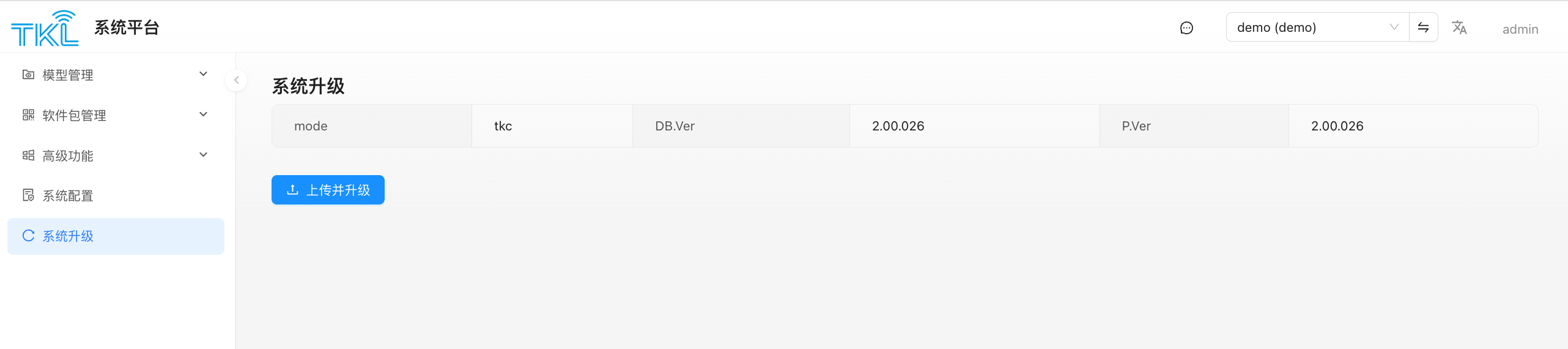
The top of the page shows the current core version info of this deployment:
| Field | Meaning |
|---|---|
| mode | Deployment form: gw (TKG, gateway edition) / tke (standalone edition) / tkc (Docker container deployment) |
| DB.Ver | Current database schema version |
| P.Ver | Current program version |
Key Point: TKG and TKE Upgrade Packages Are Not Interchangeable
The backend validates the uploaded file's name prefix based on the current mode. The wrong type of package is rejected outright:
| Current mode | Accepted filename prefix | Example |
|---|---|---|
gw | starts with tkg | tkg-2.00.020.tar.gz |
tke or tkc | starts with tke | tke-2.00.020.tar.gz |
Don't mix them up
- TKG packages (
tkg-*.tar.gz) can only be uploaded to amode=gw(gateway-edition) deployment. - TKE packages (
tke-*.tar.gz) can be uploaded to eithermode=tkeormode=tkc— the standalone-edition and the Docker container share the same upgrade package. - Uploading a wrong-prefixed package fails immediately with "The upgrade package name is invalid".
Upgrade Flow
- Back up the database (strongly recommended).
- Prepare a
.tar.gzupgrade package that matches the current mode. - Click
Upload and Upgradeon the page and pick the file. - The backend automatically:
- extracts the uploaded
.tar.gzinto the upgrade directory; - verifies the extracted content contains
tkl_upgrade.sh, otherwise aborts; - runs
tkl_upgrade.shto perform the main upgrade; - if
tkl_post_upgrade.shexists, runs it to clean up (delete the upload, clear the upgrade dir).
- extracts the uploaded
- During the upgrade the ThinkLink service may restart and the page is briefly unavailable. Once it comes back, refresh and confirm that
P.Ver/DB.Verreflect the new versions.
Risk Notes
- Always back up the database before upgrading, and have a rollback plan.
- Don't cut power or kill the process during the upgrade.
- For a remotely-deployed TKG, make sure you have an SSH fallback channel in case the web service fails to come back up.
- Schema changes between major versions are not reversible; read the release notes when skipping multiple versions.
Difference from "Gateway Upgrade Package"
| System Upgrade (this page) | Gateway Upgrade Package | |
|---|---|---|
| Who is upgraded | ThinkLink itself (TKG/TKE/TKC) | Firmware of managed gateway devices |
| Who triggers | The admin uploads directly in the System Platform | The admin uploads to the system, tenants dispatch from their own "Gateway Management" page |