KS32 Dry Contact Input Module specificationV1.0
1. Product Introduction
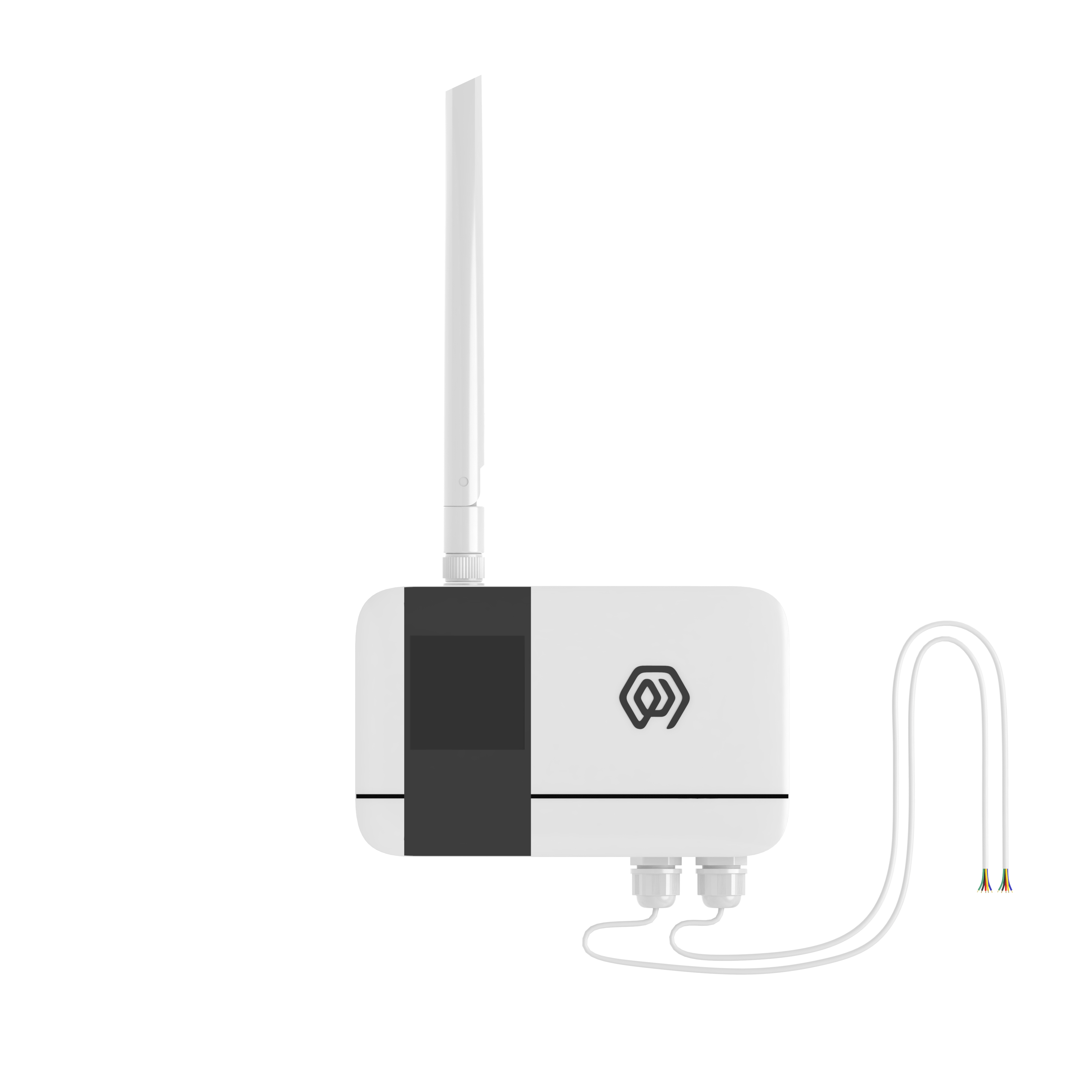
2. Product Description
KS32 is a LoRaWAN-based ® The dry contact collector for communication, the product provides 6 Dry contact interfaces, triggers internal level reversal when the dry contact state changes, KS32 triggers interruption to realize real-time collection of the dry contact change state and uploads the dry contact state and count value to LoRaWAN's NS server through LoRaWAN gateway.
KS32 based on LoRa ® Wireless technology, supports standard LoRaWAN ® Networking communication has the characteristics of long communication distance and low power consumption.
Product built-in 4*2700mAh large-capacity lithium battery, life up to 6 years.
In addition, product support with ManThink/third-party LoRaWAN The gateway is combined with the third-party IoT platform of ThinkLink, Chirp stack, and TTN to realize the monitoring and management of dry-contact switches.
KS32 has a high protection level of IP65, which can adapt to the harsh outdoor environment and can be widely used in the management needs of smart industries, smart buildings and other scenarios.
3. Main features
- IP65 protection level
- Support 6 ports Dry contact
- Battery powered, 10800mA high performance lithium battery, battery life up to 6 years
- Support ThinkLink/ChirpStack/TTN platform docking
- Support US902,AU915,AS923,EU868,EU433,CN470 LoRaWAN standards
4. Performance Parameters
| Item | Value |
|---|---|
| § Interface | |
| connect Type | PG7 |
| Number of dry contact interfaces | 6 |
| Number of grounding wires | 2 |
| Display | None |
| § Wireless Parameters | |
| Protocol | Standard LoRaWAN ® Agreement |
| Regional Standards | CN470/EU433/EU868/AS923/AU915/Us902 |
| Transmit power | Maximum Support 22dBm ( can be changed) |
| Receiving sensitivity | -142dBm(SF=12,BW=125kHz) |
| Working mode | OTAA/ABP Class A |
| § Agreement /Configuration | |
| Test/Trigger mode | The magnet 2 seconds trigger heartbeat data 6 Seconds trigger into the network |
| Configuration | By NS issue instruction |
| § Physical Characteristics | |
| Power supply mode | 4 x 2700 mAh ER14505 lithium battery |
| Sleep current | <5uA (25 ℃ at room temperature) |
| Emission current | <110mA (22dBm transmit power) |
| Battery life | 6 years (15-minute reporting cycle, 25 ℃ at room temperature) |
| Working Temperature | -40°C ~85°C |
| Relative humidity | ≤95% (no condensation) |
| Protection level | IP65 |
| Material & Color | ABS + PC, White |
| Dimensions | 120mm * 72mm * 28mm |
| Installation method | Wall Hanging |
5. Dimensions and Interfaces
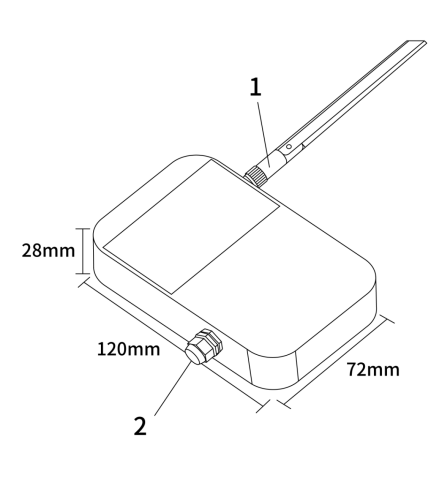
| Number | Interface Description | Specific Details |
|---|---|---|
| 1 | LoRa Antenna interface | Inner hole outer screw, according to different LoRaWAN standard match |
| 2 | Wiring Port | PG7 waterproof connector 2 GND,6 DI input interface, a total of 8 leads |
6. Model List
6.1 Model example
KS328-A1-AS923-N
6.2 Model component breakdown
KS328: product series and RF band.KS32identifies a second-generation IP65 dry-contact input module.8identifies the 800 MHz-and-above RF version for EU868, AS923, AU915 and US902.- Other band option:
4identifies the 400 MHz RF version for EU433 and CN470.
-A1: acquisition interface and power configuration.Aidentifies six digital inputs (6DI).1identifies a built-in 10800 mAh battery.
-AS923: LoRaWAN regional standard.AS923means that the device supports the LoRaWAN AS923 regional parameters.- Other regional codes are
CN470,EU433,EU868,AU915andUS902;US902denotes the LoRaWAN US915 (902–928 MHz) regional parameters.
-N: default version.Nidentifies the default version.- Other values are reserved for customized or special versions.
6.3 Complete model meaning
The complete meaning of KS328-A1-AS923-N is:
This is a second-generation IP65 dry-contact input module in the 800 MHz-and-above RF class. It provides six digital inputs, includes a 10800 mAh battery, supports the LoRaWAN AS923 regional standard, and uses the default final version code N.
7. Network topology
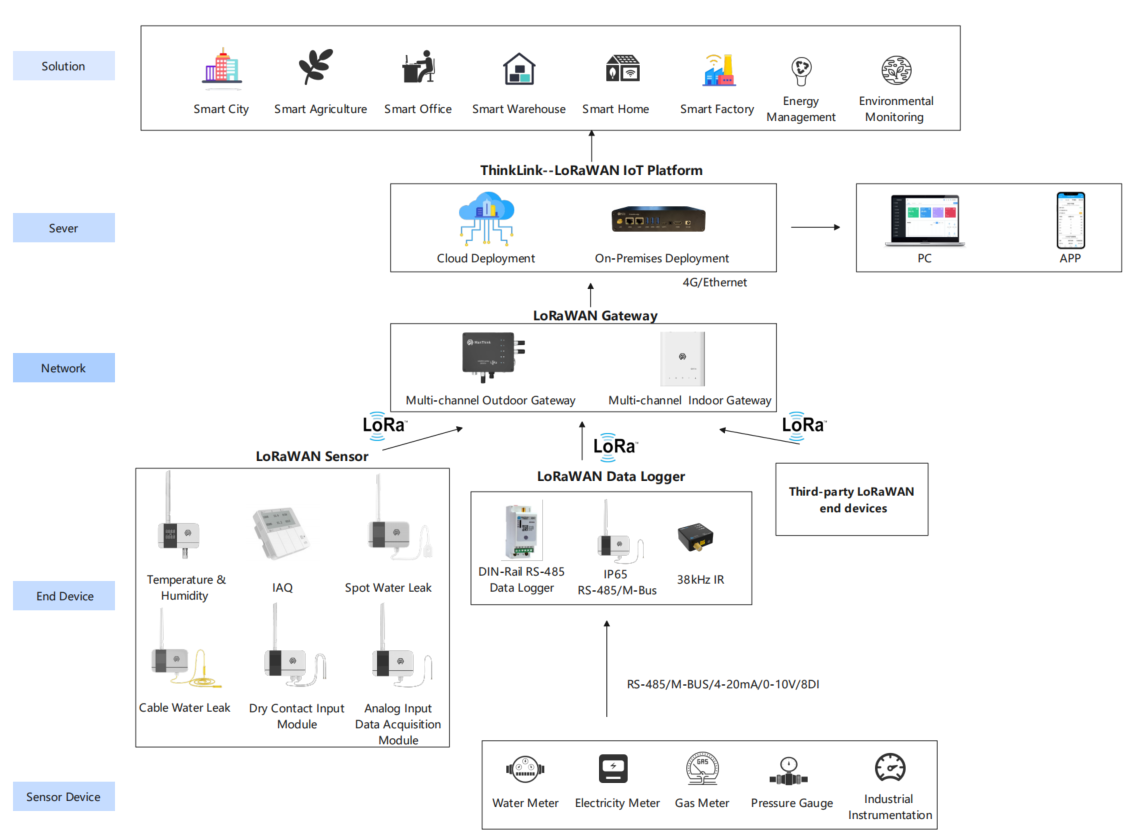
KS32 is a standard LoRaWAN device and needs LoRaWAN network support to work properly. You can use the LoRaWAN gateway of ManThink or a third-party LoRaWAN gateway with the support of LoRaWAN NS.
KS32 supports accessing standard LoRaWAN networks such as ThinkLink, Chirp stack, and TTN. You can use the ThinkLink configuration model to implement business functions, card view presentation, and other business logic.
The LoRaWAN network topology is as follows:
8. Working mode
8.1 Periodic Upload and trigger Upload
- [x] KS32 has 6 DI interfaces. KS32 monitors the Accessed DI signals in real time. When the state of any DI interface changes, it will record the number of overturns and send a packet of data to the state of the DI interface.
- [x] When no trigger event occurs, KS32 periodically reports the status and count values of six DI interfaces
- [x] The Upload cycle of KS32 is set according to the heartbeat cycle address.
Note: KS32 can only be connected to dry contacts*.*
8.2 Communication Test
Use a magnet to stick the loction of QR code on KS32 to trigger 2S-4S, which can trigger a packet of upstream measurement data.
8.3 Network access
Use a magnet to stick the location of QR code on KS32 to trigger 6s-8s, which can trigger a packet of network access data.
9. Installation and fixing
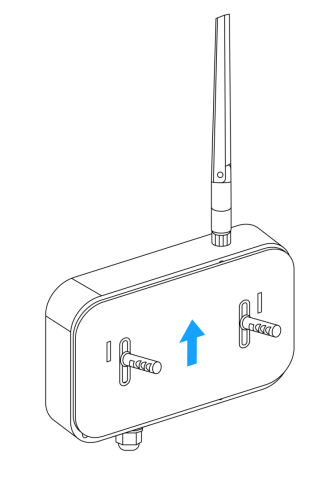
- [x] Use the drill to fix the back plate to the Wall (keep the back plate Arrow Up)
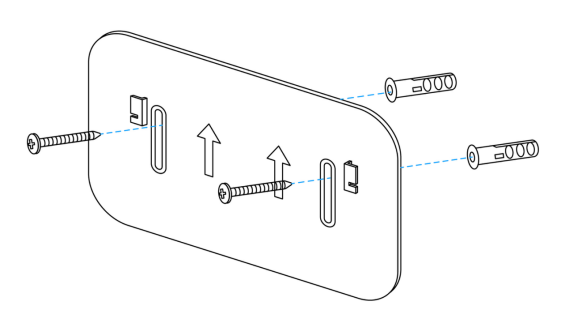
- [x] Hatch the product on the back plate (slide down after aligning the groove on the back of the sensor with the convex part of the back plate)
10. According to the standard
Reference: PTL-D01 ManThink Technology IoT Terminal Application Layer General Protocol V1.5
11. Data Items and Identifiers
- [x] LoRaWAN port number = 15
KS32 supports only one data format, for example:
82 24 1A FF00AE 0D000000 D1000000 52000000 52000000 1C000000 28000000
| Number | Data Item | Example | Start Address | Length | Description |
|---|---|---|---|---|---|
| 1 | Version number | 0x82 | 0 | 1 byte | Fixed at 0x82 |
| 2 | Control word | 0x24 | 1 | 1 byte | Fixed at 0x24 |
| 3 | Identifier | 0x1A | 2 | 1 byte | Fixed at 0x1A |
| 4 | DI status | 0xFF | 3 | 1 byte | See the bit0–bit5 mapping and values below |
| 5 | Fault status | 0x00 | 4 | 1 byte | 0x00: normal; 0x01: ferroelectric-memory fault |
| 6 | Battery voltage | 0xAE | 5 | 1 byte | Actual value = sample × 1.6 / 254 + 2 V |
| 7 | Port 1 count | 0x0000000D | 6 | 4 bytes | Unsigned 32-bit little-endian integer |
| 8 | Port 2 count | 0x000000D1 | 10 | 4 bytes | Unsigned 32-bit little-endian integer |
| 9 | Port 3 count | 0x00000052 | 14 | 4 bytes | Unsigned 32-bit little-endian integer |
| 10 | Port 4 count | 0x00000052 | 18 | 4 bytes | Unsigned 32-bit little-endian integer |
| 11 | Port 5 count | 0x0000001C | 22 | 4 bytes | Unsigned 32-bit little-endian integer |
| 12 | Port 6 count | 0x00000028 | 26 | 4 bytes | Unsigned 32-bit little-endian integer |
11.1 DI status bit mapping
| Bit | DI input | 0 | 1 |
|---|---|---|---|
| bit0 | DI1 | Closed | Open |
| bit1 | DI2 | Closed | Open |
| bit2 | DI3 | Closed | Open |
| bit3 | DI4 | Closed | Open |
| bit4 | DI5 | Closed | Open |
| bit5 | DI6 | Closed | Open |
The current KS32 thing model uses only bit0–bit5 and six counter values. It does not map bit6, bit7, or trailing bytes after index 29 to DI7/DI8, and it does not parse those fields.
12. ThinkLink reference model
Sign in to ThinkLink, search for KS32 in the model menu, and add the device with the MT-KS32 template.
12.1 Telemetry thing model
The telemetry thing-model identifier is mt_ks32, and the LoRaWAN port is 15.
| Fields | Type / unit | Description |
|---|---|---|
chan1–chan6 | Number | Six dry-contact states: 0 = closed, 1 = open |
status | Number | Device fault status |
battery | V | Converted battery voltage |
counter1–counter6 | Unsigned 32-bit integer | Six device cumulative counter values |
rssi, snr | dBm, dB | LoRaWAN link-quality fields |
counter1–counter6 are the final counts calculated by the device and already include their corresponding initial values. Applications must not subtract base1–base6 again.
12.2 Parameter thing model
Parameter readback is handled by the mt_ks32_para thing model. It contains period_up, triggerEnable, pulseThreshold, throttleWindow, and base1–base6. The existing pulseThreshold thing-model field maps to the trigger dead-zone window at addresses 92–93, while throttleWindow maps to the throttle protection window at addresses 94–95; both values are in seconds. A device readback value of 0 or 1 for triggerEnable is normalized to a boolean for form prefilling and write-result validation.
13. Parameter modification and RPCs
Parameter changes follow PTL-D01 ManThink Technology IoT Terminal Application Layer General Protocol V1.5.
13.1 Configuration parameter address table
| Number | Data Item | Default Value | Start Address | Length | Description |
|---|---|---|---|---|---|
| 1 | Upload interval (period_up) | 900 | 40 | 4 bytes | Little-endian, unit: seconds |
| 2 | Trigger-uplink enable (triggerEnable) | true (1) | 90 | 1 byte | See the behavior values in 13.4 |
| 3 | Firmware version (FwVer) | — | 91 | 1 byte | KS32 firmware version; read-only parameter |
| 4 | Trigger dead-zone window (existing thing-model field pulseThreshold) | 0 | 92 | 2 bytes | Little-endian, unit: seconds. Defines how long the device stops responding to subsequent DI level changes within the event segment after one trigger |
| 5 | Throttle protection window (throttleWindow) | 5 | 94 | 2 bytes | Little-endian, unit: seconds. Only one data packet is sent over LoRaWAN during this window |
| 6 | Maximum pulse width | 0 | 96 | 2 bytes | Little-endian, unit: ms. Pulses wider than this maximum are not measured or counted. For pulse measurement, set the trigger dead-zone window to 0 |
| 7 | Minimum pulse width | 200 | 98 | 2 bytes | Little-endian, unit: ms. Pulses narrower than this minimum are not measured or counted. For pulse measurement, set the trigger dead-zone window to 0 |
| 8 | Initial-value modification key (modifyKey) | Write only | 100 | 2 bytes | The RPC writes 0xFAFA automatically when changing base1–base6 |
| 9 | Channel 1 counter initial value | 0 | 102 | 4 bytes | base1; counter1 continues from this value |
| 10 | Channel 2 counter initial value | 0 | 106 | 4 bytes | base2; counter2 continues from this value |
| 11 | Channel 3 counter initial value | 0 | 110 | 4 bytes | base3; counter3 continues from this value |
| 12 | Channel 4 counter initial value | 0 | 114 | 4 bytes | base4; counter4 continues from this value |
| 13 | Channel 5 counter initial value | 0 | 118 | 4 bytes | base5; counter5 continues from this value |
| 14 | Channel 6 counter initial value | 0 | 122 | 4 bytes | base6; counter6 continues from this value |
The trigger dead-zone window suppresses responses to subsequent level changes after a trigger. The throttle protection window limits LoRaWAN transmission frequency; these two windows serve different purposes. For pulse measurement and counting, only pulses whose widths fall between the configured minimum and maximum are counted, and the trigger dead-zone window must first be set to 0.
13.2 ThinkLink RPCs
| RPC Name | Type | Parameters | Description |
|---|---|---|---|
mt_ks32_set | SET | period_up, triggerEnable, pulseThreshold, throttleWindow, base1–base6 | Sets parameters; pulseThreshold is the trigger dead-zone window in seconds, and throttleWindow is the throttle protection window in seconds; the form prefills current shared attributes and automatically includes modifyKey=0xFAFA |
mt_ks32_get | GET | None | Reads the current parameters and updates the parameter thing model and shared attributes |
mt_ks32_clear_counter | ACT | None | Writes zero to base1–base6 to clear all six device counters; no current telemetry value is required |
13.3 Counter initial values and clearing
The protocol field names remain base1–base6, but these fields are not application-side offsets. After writing baseN=X, the corresponding counterN continues from X. The counterN reported on port 15 is already the final value, so applications must not calculate counterN - baseN.
To clear the counters, use mt_ks32_clear_counter. This RPC automatically includes modifyKey=0xFAFA and writes zero to all six counter initial values.
13.4 Trigger-uplink enable values
| Value | Behavior when a DI input level changes |
|---|---|
0x00 | Increment the counter only; do not send an uplink packet |
0x01 | Send one uplink packet immediately when any DI input level changes |
13.5 Protocol items not exposed by the current RPCs
The following device protocol addresses remain defined by PTL-D01, but the current MT-KS32 template does not expose them through its SET/GET RPCs:
| Data Item | Address | Current status |
|---|---|---|
| Reset | 9 | Not implemented by the current RPCs |
Firmware version (FwVer) | 91 | Not read by the current RPCs |
| Maximum pulse width | 96–97 | Not implemented by the current RPCs |
| Minimum pulse width | 98–99 | Not implemented by the current RPCs |
14. Contact Us
Website: www.manthink.cn
Email: info@manthink.cn
Tel: +86-15810684257
15. Manual Downloads
PUBLIC integration models
Select MT-KS32 and check the models and RPCs below. Confirm parameter changes from fresh device feedback; Class A operations wait for receive windows. Template defaults do not establish the current configuration of existing devices.
Model catalog
| Model type | Name | id_name | Platform model ID |
|---|---|---|---|
| Template | MT-KS32 | 7 | |
| Thing Model | MT-KS32 | mt_ks32 | 24194975885430789 |
| Thing Model | [MT KS32 PARA] | mt_ks32_para | 94482193715302405 |
| RPC | [MT KS32 ACT] clear counter | mt_ks32_clear_counter | 141861968431443968 |
| RPC | [MT KS32 GET] para | mt_ks32_get | 24196240119959557 |
| RPC | [MT KS32 SET] para | mt_ks32_set | 24197409982648325 |