1. Organization
1.1. Organization Permission
- each user account can only manage one organization as an administrator.
- But can be as a member join other organizations, and participate in collaboration within the scope of authority.
1.2. New Organization
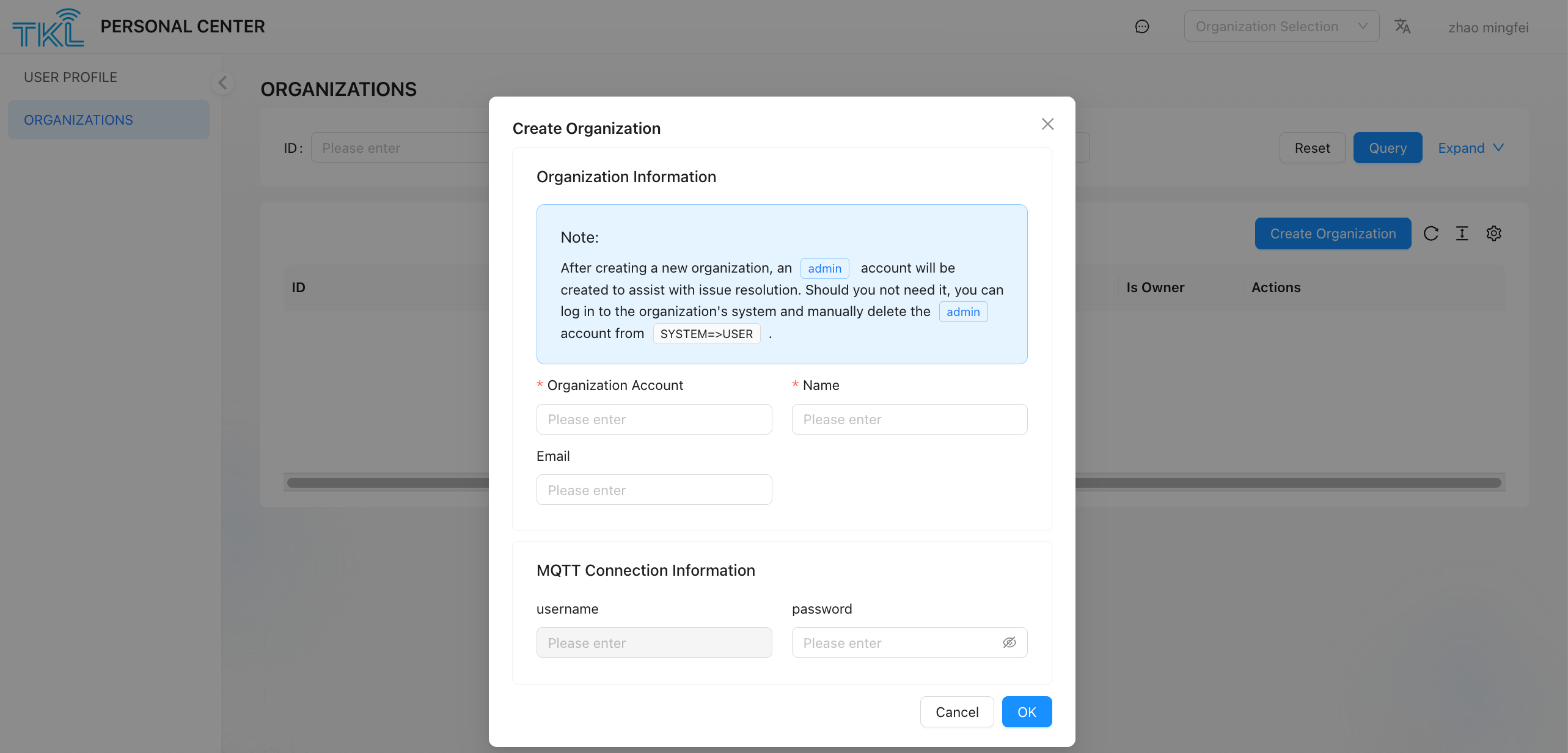
it is applicable to users who want to create a new organization and serve as its administrator. Note that after the user adds a new organization, the admin account will be automatically added to assist the user in handling problems. If the admin account is not required, please log on to the system page of the organization and clickSystem ->User delete admin manually.
- Enter
ORGNIZATIONSpage, click Creat Organization button. - Fill in the following required information (all fields need to be unique within the system):
| field Name | description |
|---|---|
| Organization Account | the unique code used to identify the organization. It consists of lowercase letters, numbers, and underscores (_). This account will be used to generate the user code and be used as tenant field. |
| Name | the display name of the organization, which can be used for external display. |
| MQTT password | used for identity authentication when a third-party platform subscribes to ThinkLink data through the MQTT protocol. Please keep this password safely. |
- After confirming that the information is correct, click Submit, and the system will create a new organization, and the current user will automatically become the administrator of the organization.