1. EBCompiler
EB (EdgeBus) is a virtual machine running on low-power MCUs. EB enables complex sensor integration through programming with TypeScript. For a detailed introduction to EB, please refer to [EN] AN-25100101 EB compiler SDK instructions
ThinkLink provides an EB cloud compilation platform, allowing users to input TypeScript code and compile it online into an obin file for device firmware updates.
1.1. Add New EB Code
- Note 1: Unlike using the SDK, the
mainfunction definition and execution are already built into the cloud compilation system. Therefore, you must exclude themainfunction from your code. - Note 2: Each EB code must have a unique combination of
BzTypeandBzVersion. Duplicated combinations will result in device upgrade failures. - Note 3: The
SwVersionmust match the firmware version of the target device. The current latest EB version is 31.
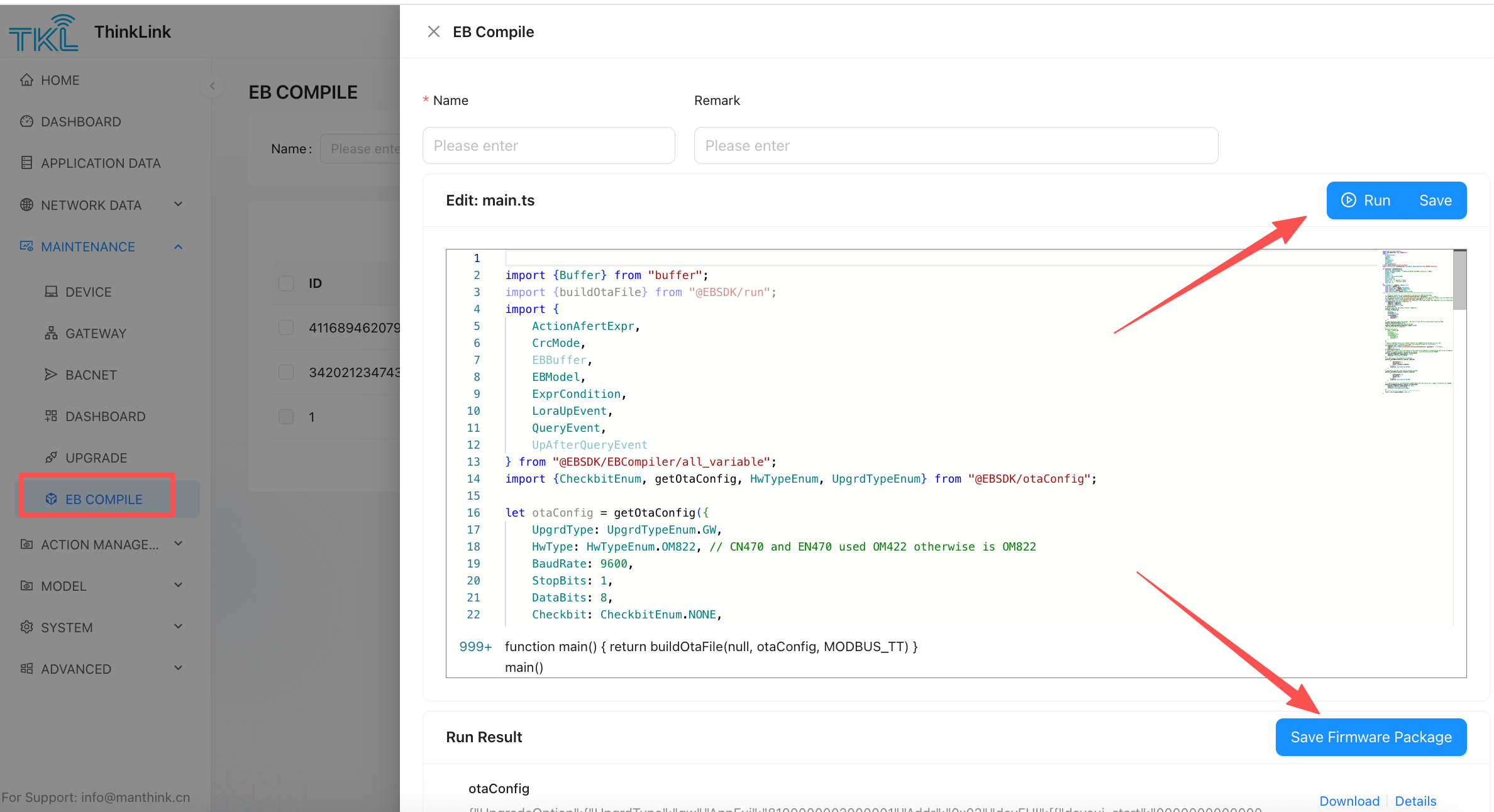
[ 1 ] After clicking "Add", the system will generate a default code template. Replace the sample code with your own implementation.
[ 2 ] Assign a name and add remarks for the EB code.
[ 3 ] Click "Compile" to generate the corresponding obin file.
[ 4 ] Click "Save Firmware Package" to store the compiled firmware package in the system for future EB upgrades.
[ 5 ] Click "Save" to save the EB code to the system.