1. Device Action
Supports multiple operations on devices, including: RPC calls, MCP command issuance, report generation, notification sending, alarm checks, etc.
Device action requires binding to scheduled tasks and supports the following scenarios:
- Timed action for single or multiple devices (e.g., triggering operations at fixed times).
- Schedule tasks (e.g., hourly parameter collection, daily device attribute updates).
1.1. Configuration
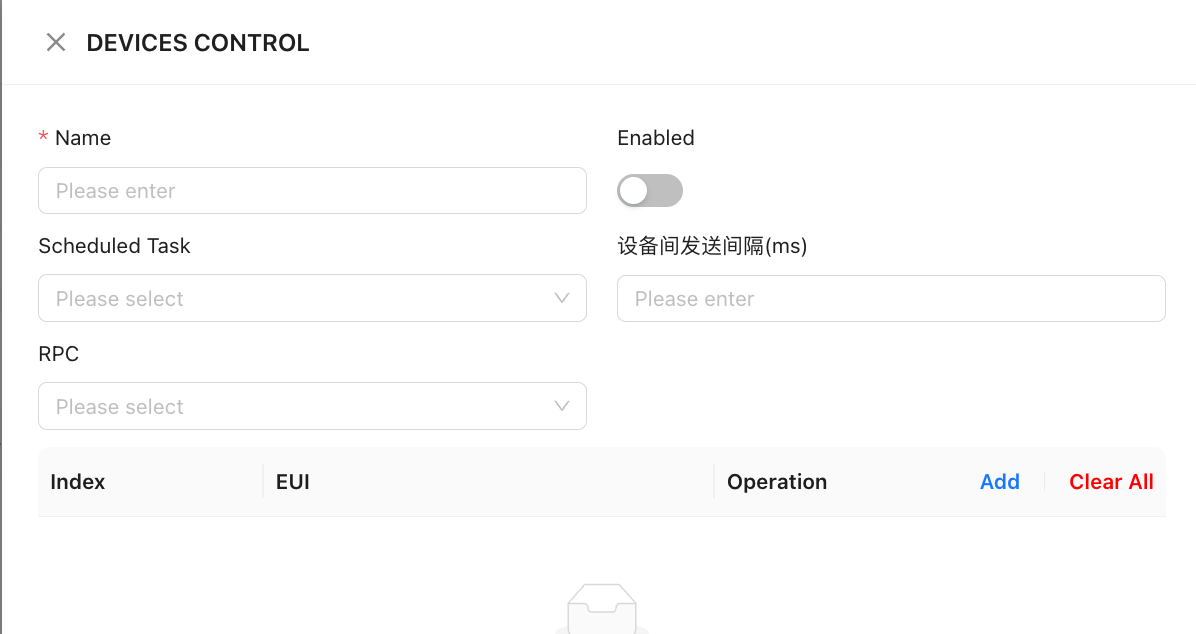
When adding an execution event, the following information must be provided:
- Basic Information+ Name: Custom name for the execution event.
- Enable Switch: Controls whether the event is active.
- Task Binding + Scheduled Task: Select from the dropdown list (a preconfigured task matching business requirements must be created first).
- Execution Settings + Device Send Interval (for batch operations): Sets the time interval between device executions.
- RPC Operation: Select specific commands and enter necessary parameters (if applicable).
- Device Scope + Add Target Devices (supports single or batch selection).