1. AS data
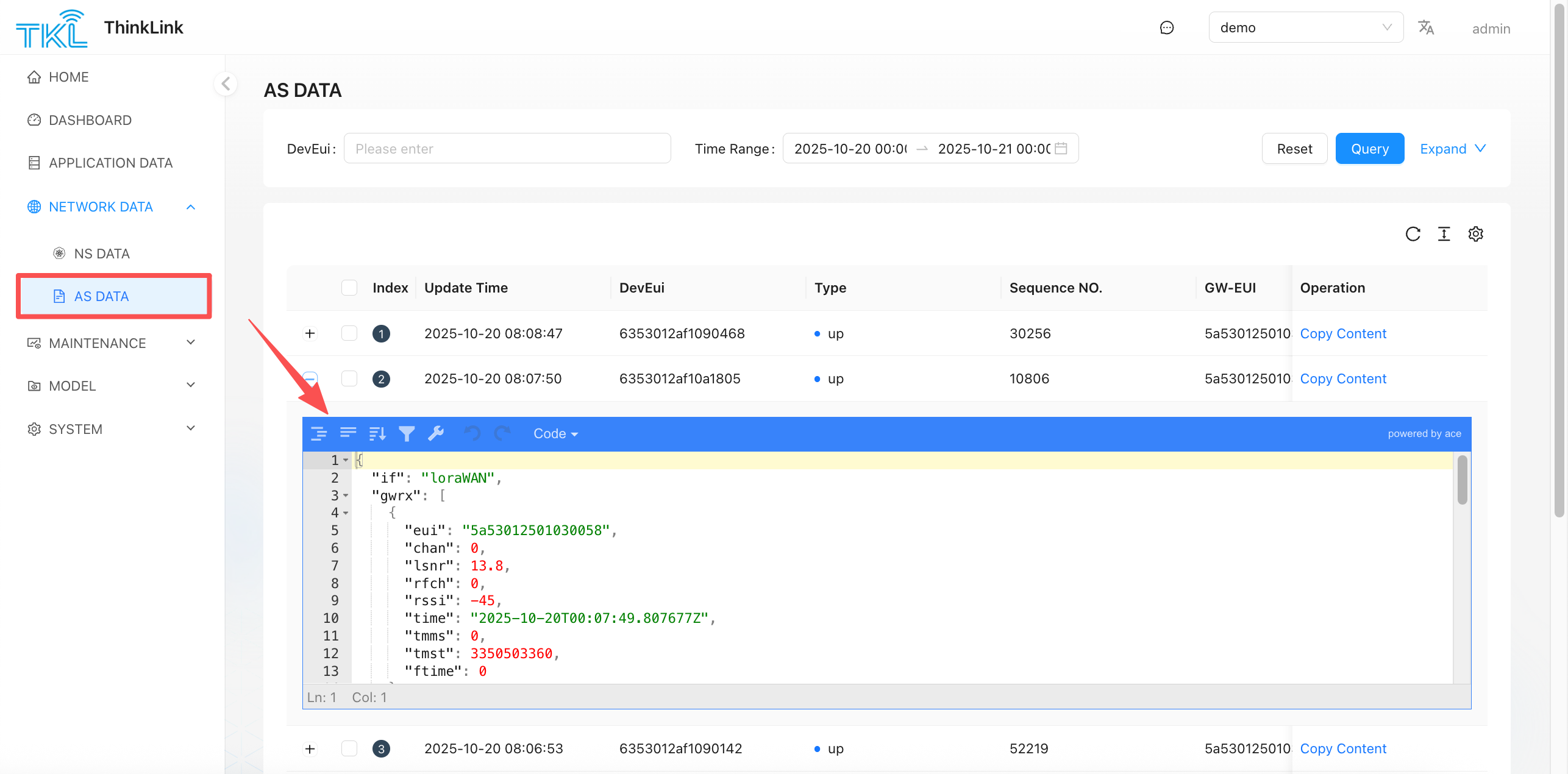
AS data is the real-time application layer data parsed by the LoRaWAN network server (NS) in the ThinkLink(TKL) system. Different from the original NS data, the AS data has been preliminarily decoded according to the device communication protocol defined by ManThink, so that users can view the upstream and downstream structured log information.
The device communication protocol of ManThink follows [EN] PTL-S05 ASP LoRaWAN NS and Application Server Communication Protocol
the protocol specifies the format, encoding, message type and interaction process of the data field in detail. Through AS data, users can intuitively monitor the telemetry information (such AS temperature, humidity, and power) reported by the device and the execution of control instructions issued by the platform.
For scenarios that require access to a third-party system, if you want to obtain data that has not been further processed by the TKL model, you can subscribe to a specific topic through the MQTT protocol to implement real-time data reception and forwarding. For specific subscription methods and topic rules, refer to the definitions in the preceding documents.
1.1. Upstream data example (up)
{
  "if": "loraWAN",
  "gwrx": [
    {
      "eui": "5a53012501030056",
      "chan": 0,
      "lsnr": 14.2,
      "rfch": 0,
      "rssi": -21,
      "time": "2025-09-24T07:07:03.807677Z",
      "tmms": 0,
      "tmst": 1152383989,
      "ftime": 0
    },
    {
      "eui": "5a53012501030011",
      "chan": 3,
      "lsnr": 12.5,
      "rfch": 0,
      "rssi": -97,
      "time": "2025-09-24T07:07:03.807677Z",
      "tmms": 0,
      "tmst": 2679707811,
      "ftime": 0
    },
    {
      "eui": "5a53012501030058",
      "chan": 3,
      "lsnr": 13.8,
      "rfch": 0,
      "rssi": -37,
      "time": "2025-09-24T07:07:03.807677Z",
      "tmms": 0,
      "tmst": 1832384199,
      "ftime": 0
    }
  ],
  "type": "data",
  "token": 56368,
  "moteTx": {
    "codr": "4/5",
    "datr": "SF7BW125",
    "freq": 470.9,
    "modu": "LORA",
    "macAck": "",
    "macCmd": ""
  },
  "geoInfo": {
    "type": "gw:wifi",
    "accuracy": 50,
    "altitude": 0,
    "latitude": 34.19863,
    "longitude": 108.86273
  },
  "moteeui": "6353012af1090498",
  "version": "3.0",
  "userdata": {
    "port": 11,
    "class": "ClassA",
    "seqno": 27464,
    "payload": "IQcDDG4BAADaBB0C538J",
    "confirmed": false
  }
}description:
- this is a typical uplink data packet, indicating that the terminal device sends data to the Gateway.
gwrxthe array shows the signal quality (RSSI, LSNR) of the frame received by multiple gateways, which can be used to locate the best path or analyze the coverage.moteeuirepresents the unique identification of the sender device.userdata.payloadpayload data encoded as Base64 needs to be parsed in conjunction with the model to obtain actual business data (such as sensor values).portfields are used to distinguish between different data types or functional channels.geoInfothe geographic coordinate information of the Gateway is provided, which is applicable to application scenarios that support location services.
1.2. Downlink Data Example (dn)
{
  "dn": {
    "if": "loraWAN",
    "type": "data",
    "token": 1758686562078,
    "moteeui": "6353012af1099301",
    "version": "3.0",
    "userdata": {
      "port": 51,
      "type": "data",
      "fpend": false,
      "payload": "/mgSBgNWBQZoHBA1MzMzMzMzM04zAAAAAAAAABY=",
      "dnWaitms": 3000,
      "TxUTCtime": "",
      "confirmed": false,
      "intervalms": 0
    }
  }
}description:
- this is a typical downlink data packet, indicating that an instruction is delivered from the network server to the terminal device.
moteeuispecifies the target device address.userdata.payloadfor the encrypted or encoded instruction content to be issued, it is usually generated by the application layer and sent by NS scheduling.port51, commonly used for device management operations (such as parameter configuration, firmware upgrade, etc.).dnWaitmsIndicates the maximum delay time for the system to wait for the downlink window of the device to open, ensuring that data is sent at an appropriate time.- You can check whether the downlink data is successfully scheduled through the AS log, and verify the execution result in combination with the device feedback.
Prompt: This function is applicable to advanced integration scenarios where you need to customize data parsing logic or connect to a private platform. It is recommended that developers compare and verify NS data with AS data during debugging to ensure data consistency.