传感器特点
DYP-A02-V2.0 系列是采用封闭式分体防水探头设计的高性能测距模组。
具备一定防尘防水等级,适用于潮湿、恶劣的测量场合。3cm 较小盲区,适配多种检测条件,是一款操作简单、高性能、高可靠性的商用级功能性模组。 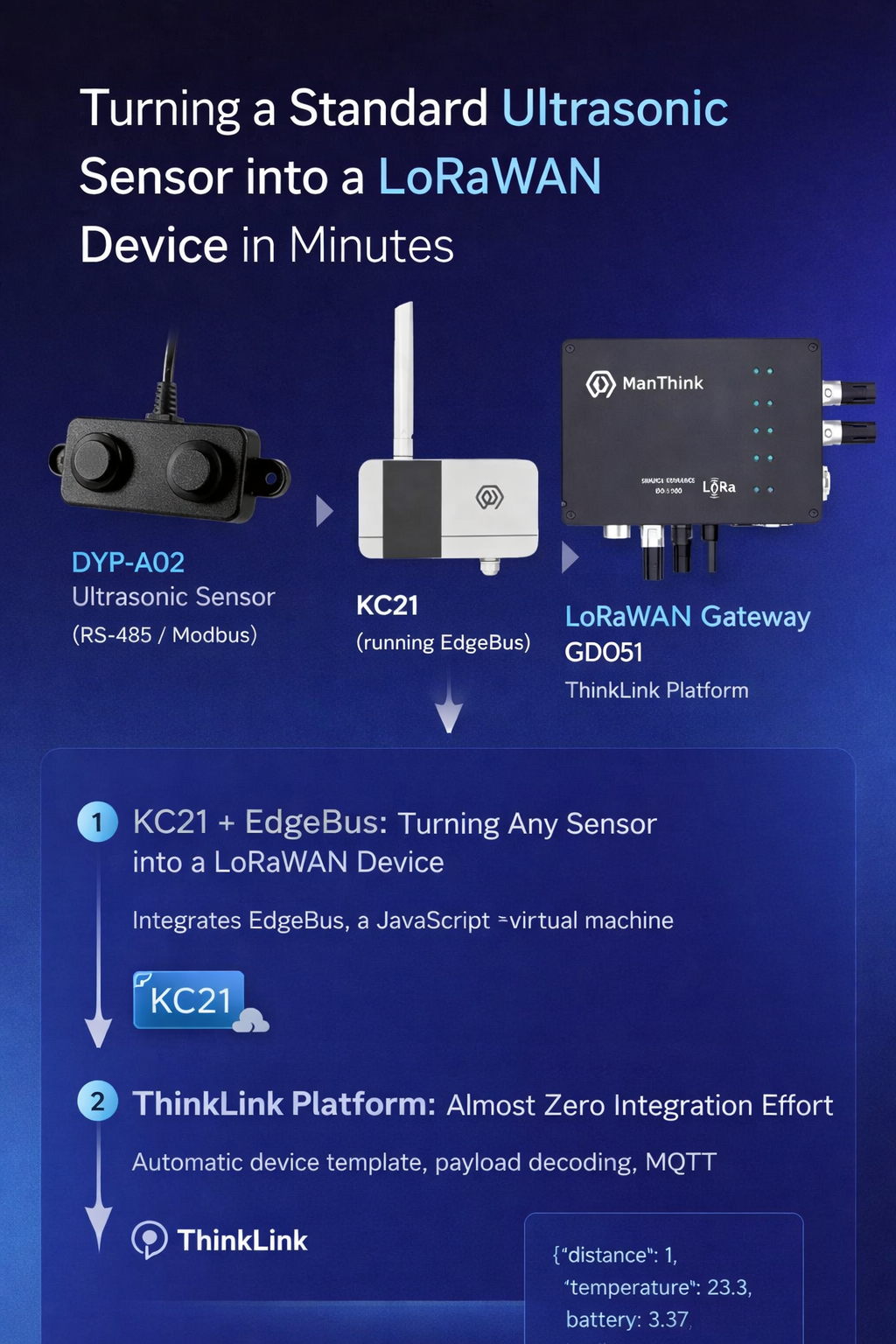
产品特点
- 3cm 小盲区
- 电源供电:3.3~5 V(RS-485 输出版本为 5~24 V)
- 五种输出方式可选
- 封闭式分体防水探头
- 工作温度:-15 ℃ ~ +60 ℃
- 存储温度:-25 ℃ ~ +80 ℃
- 低功耗设计:待机电流 < 5 μA
- 静电防护设计:连接引线集成静电防护器件,符合 IEC 61000-4-2 标准
产品优点
- 盲区小
- 抗干扰强
- 数据输出稳定可靠
- 功耗低
- 响应时间快
- 抗静电能力强
- 工作温度范围宽
- 测量精度高
适用范围
- 水平测距
- 停车管理系统
- 机器人避障与自动控制
- 物体接近与存在检测
对接信息
硬件信息
- 产品资料:DYP-RD-产品规格书(DYP-A02-V2.0)-220912-A0.pdf
- 设备型号:DYP-A02-V2.0(RS-485 接口版本)
- 通信协议:Modbus-RTU
- 默认从机地址:
0x01(可通过命令修改) - 默认波特率:9600 bps,8N1(可通过命令修改)
- 供电电压:5~24 V
- 功耗:
- 待机电流:< 5 μA
- 平均工作电流:≤ 15 mA
- 峰值工作电流:< 75 mA
- 预热时间:5 ms
- 接线定义(共 4 根线):
VCC(电源正)GND(地)RS-485A(白色线)RS-485B(黄色线)
- 测试 DTU:KC21(A1 版本),提供 15 V 电源并连接 RS-485 接口
数据采集
需采集以下两个寄存器数据:
0x0100:距离值(处理值)0x0102:温度值
| 状态 | 寄存器地址 | 寄存器功能 | 数据类型 | 说明 |
|---|---|---|---|---|
| 只读 | 0x0100 | 处理值 | 无符号整型,16 位 | 收到指令后启动测距,经算法处理输出距离值,单位:mm;响应时间约 520 ms |
| 只读 | 0x0101 | 实时值 | 无符号整型,16 位 | 收到指令后启动测距,直接输出实时距离值,单位:mm;响应时间约 120 ms |
| 只读 | 0x0102 | 温度 | 有符号整型,16 位 | 单位:0.1 ℃;分辨率:0.5 ℃;响应时间约 120 ms |
| 读写 | 0x0200 | 从机地址 | 无符号整型,16 位 | 范围:0x01 ~ 0xFE;默认值:0x01;0xFF 为广播地址 |
| 读写 | 0x0201 | 波特率 | 无符号整型,16 位 | 设置后立即生效。对应关系:0x0001 → 2400 bps0x0002 → 4800 bps0x0003 → 9600 bps0x0004 → 14400 bps0x0005 → 19200 bps0x0006 → 38400 bps0x0007 → 57600 bps0x0008 → 76800 bps0x0009 → 115200 bps |
模型
EB 代码
通过 EB Helper 工具配置,关键参数如下:
bzType:21305Battery:true(启用电池电量上报)- 上传周期(app 地址
70) - 采集周期(app 地址
74) - 距离 COV 阈值(app 地址
110) - 上行协议:
port=22,version=0x83,dataType=0x37 - 应用层数据:采集
0x0100(距离)和0x0102(温度),总长度 10 字节
⚠️ 注意:编译后下载至支持 EdgeBus 的硬件(如 KC21 / KC11)。
typescript
import { Buffer } from "buffer";
import { buildOtaFile } from "@EBSDK/run";
import {
  ActionAfertExpr,
  CalcData,
  CrcMode,
  CvtRule,
  EBBuffer,
  EBModel,
  ExprCondition,
  LoraUpEvent,
  QueryEvent,
  SetUpCovDataType,
  UserConfUPItem,
  EventInfoItem
} from "@EBSDK/EBCompiler/all_variable";
import { CheckbitEnum, getOtaConfig, HwTypeEnum, UpgrdTypeEnum } from "@EBSDK/otaConfig";

////////////////////////////////////////////////////////////////////////////////////////
const eventInfo: UserConfUPItem[] = [
  {
    name: "dyp-A02",
    port: 22,
    version: "0x83",
    dataType: "0x37",
    upPeriodIndex: 70,
    quInfo: [
      {
        protocol: "modbus",
        addr: "0x01",
        code: "0x03",
        periodIndex: 74,
        isLast: false,
        listVal: [
          { start: "0x0100", end: "0x0100", covType: "Uint16BE", covAppIndex: 110 },
          { start: "0x0102", end: "0x0102" }
        ]
      }
    ]
  }
];

let otaConfig = getOtaConfig({
  UpgrdType: UpgrdTypeEnum.GW,
  SwVersion: 31,
  HwType: HwTypeEnum.OM822, // 请根据实际硬件型号调整(如 KC21 → HwTypeEnum.KC21)
  BaudRate: 9600,
  StopBits: 1,
  DataBits: 8,
  Checkbit: CheckbitEnum.NONE,
  Battery: true, // ✅ 此处原文为 `ture`,已修正拼写错误
  ConfirmDuty: 60,
  BzType: 21305,
  BzVersion: 11
});

const MODBUS_TT = (ebModel: EBModel) => {
  for (let i = 0; i < eventInfo.length; i++) {
    let event = new EventInfoItem(eventInfo[i]);
    event.upEventSetup();
    event.eventInstall();
  }
  return JSON.stringify(ebModel, null, 2);
};

buildOtaFile(__filename, otaConfig, MODBUS_TT);
物模型
上行帧结构
- 端口号:
22 - 协议格式:EBHelper 标准帧(大端序 BE)
| 字段名 | 偏移 | 长度 (Bytes) | 含义说明 |
|---|---|---|---|
version | 0 | 1 | 协议版本号,固定为 0x83 |
dataType | 1 | 1 | 固定为 0x37 |
covStatus | 2 | 1 | 保留字节 |
status | 3 | 1 | 查询事件状态 |
battery | 4 | 1 | 电池电量(0~100,单位 %) |
addr | 5 | 1 | 子设备地址(Modbus 从机地址) |
distance | 6 | 2 | 距离值,Uint16BE,单位 mm |
temperature | 8 | 2 | 温度值,Uint16BE,单位 0.1 ℃(需除以 10) |
第三方平台数据订阅
MQTT Topic
plain
/v32/{Organization Account}/tkl/up/telemetry/{eui}上报示例数据
json
{
  "eui": "6353012af10a9331",
  "active_time": "2026-02-05T08:35:48.000Z",
  "thingModelId": "71719731542888453",
  "thingModelIdName": "zenner_21121",
  "telemetry_data": {
    "snr": 13.5,
    "rssi": -51,
    "battery": 3.37,
    "distance": 1,
    "temperature": 23.3
  }
}
协议说明文档
RPC
设置参数
- RPC 名称:
dyp_a02_set - 参数说明:
period_up:上行周期(秒),app 地址70period_read:读取周期(秒),app 地址74cov_distance:距离 COV 阈值(mm),app 地址110
javascript
let classMode = (device && device.shared_attrs && device.shared_attrs.class_mode) || "ClassA";
let sleepMs = classMode === "ClassA" ? 500 : 5000;

let paraDef = {
  app_70: {
    name: "period_up",
    field_name: "period_up",
    unit: "S",
    type: "uint32le",
    coefficient: 1,
    decimal: 0,
    optionList: {}
  },
  app_74: {
    name: "period_read",
    field_name: "period_read",
    unit: "S",
    type: "uint32le",
    coefficient: 1,
    decimal: 0,
    optionList: {}
  },
  app_110: {
    name: "cov_distance",
    field_name: "cov_value",
    unit: "mm",
    type: "int16BE",
    coefficient: 1,
    decimal: 0,
    optionList: {}
  }
};

let frames = RPCHelper.buildFrame({
  paraDef: paraDef,
  params: params
});

let redoBuffer = RPCHelper.redo();
let dnBuffer = Buffer.alloc(frames.writeBuffer.length + frames.readBuffer.length + redoBuffer.length);

frames.writeBuffer.copy(dnBuffer, 0);
frames.readBuffer.copy(dnBuffer, frames.writeBuffer.length);
redoBuffer.copy(dnBuffer, frames.writeBuffer.length + frames.readBuffer.length);

logger.info("set dyp-a02 para");
console.log(dnBuffer.toString("hex"));

let msg = RPCHelper.makeMSG({
  msgType: Utils.msgType.paras,
  device: device,
  dnBuffer: dnBuffer,
  sleepTime: sleepMs
});

return [msg];
读取参数
读取结果将写入设备共享属性(device.shared_attrs)。
javascript
let classMode = (device && device.shared_attrs && device.shared_attrs.class_mode) || "ClassA";
let sleepMs = classMode === "ClassA" ? 500 : 5000;

let paraDef = {
  app_70: {
    name: "period_up",
    field_name: "period_up",
    unit: "S",
    type: "uint32le",
    coefficient: 1,
    decimal: 0,
    optionList: {}
  },
  app_74: {
    name: "period_read",
    field_name: "period_read",
    unit: "S",
    type: "uint32le",
    coefficient: 1,
    decimal: 0,
    optionList: {}
  },
  app_110: {
    name: "cov_distance",
    field_name: "cov_value",
    unit: "mm",
    type: "int16BE",
    coefficient: 1,
    decimal: 0,
    optionList: {}
  }
};

let frames = RPCHelper.buildFrame({
  paraDef: paraDef,
  params: params
});

let msg = RPCHelper.makeMSG({
  msgType: Utils.msgType.paras,
  device: device,
  dnBuffer: frames.readBuffer,
  sleepTime: sleepMs
});

return [msg];
模板选择
在 ThinkLink 平台搜索模板关键词:DYP-A02 即可快速选用。